> ## Documentation Index
> Fetch the complete documentation index at: https://docs-dev-feat-sdk-reference-docs.mintlify.site/llms.txt
> Use this file to discover all available pages before exploring further.

> Learn how to configure an update policy form using Forms for Actions for users to review and accept new terms of service or consent updates.

# Use Cases: Configure an update policy form using Forms

<Card title="Before you start">
  1. Create a [Machine-to-Machine Application](/docs/get-started/auth0-overview/create-applications/machine-to-machine-apps) with the following scopes enabled:

  * `read:users`
  * `update:users`
  * `create:users`
  * `read:users_app_metadata`
  * `update:users_app_metadata`
  * `create:users_app_metadata`

  2. Add a [Vault connection](/docs/customize/forms/vault) using the M2M application credentials.
</Card>

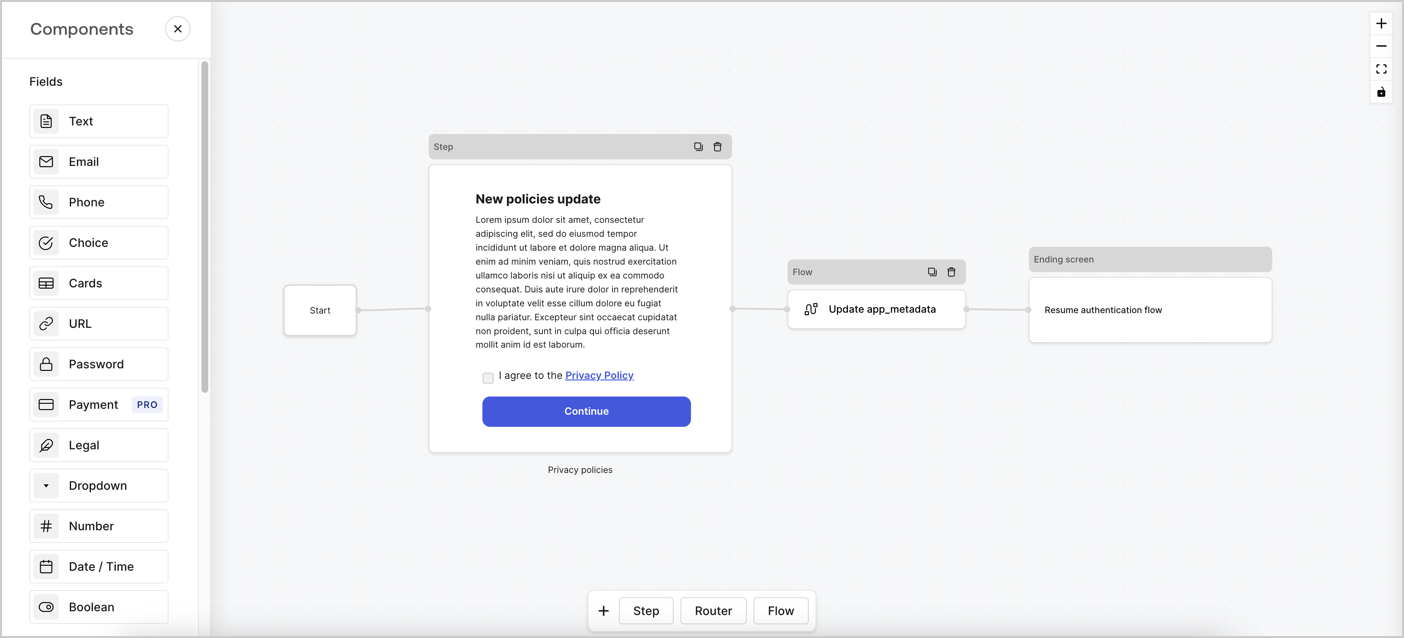
Forms for Actions allows you to create custom privacy policies flows and store the consent under the `app_metadata` object.
<Frame>
  <img src="https://mintcdn.com/docs-dev-feat-sdk-reference-docs/0tYOZc0OW-lAvvrU/docs/images/cdy7uua7fh8z/6i68dMvHDTijfRmSgN1x8Q/ad900e7d4c0fb34645921435472b8684/privavy-policy-form.png?fit=max&auto=format&n=0tYOZc0OW-lAvvrU&q=85&s=65f7d416f8dcc80c73d1de2d39c489ad" alt="Dashboard > Actions > Forms > Privacy policy use case" data-og-width="1404" width="1404" data-og-height="638" height="638" data-path="docs/images/cdy7uua7fh8z/6i68dMvHDTijfRmSgN1x8Q/ad900e7d4c0fb34645921435472b8684/privavy-policy-form.png" data-optimize="true" data-opv="3" srcset="https://mintcdn.com/docs-dev-feat-sdk-reference-docs/0tYOZc0OW-lAvvrU/docs/images/cdy7uua7fh8z/6i68dMvHDTijfRmSgN1x8Q/ad900e7d4c0fb34645921435472b8684/privavy-policy-form.png?w=280&fit=max&auto=format&n=0tYOZc0OW-lAvvrU&q=85&s=58c14fbf04cc53011c24554bf1da78d1 280w, https://mintcdn.com/docs-dev-feat-sdk-reference-docs/0tYOZc0OW-lAvvrU/docs/images/cdy7uua7fh8z/6i68dMvHDTijfRmSgN1x8Q/ad900e7d4c0fb34645921435472b8684/privavy-policy-form.png?w=560&fit=max&auto=format&n=0tYOZc0OW-lAvvrU&q=85&s=dd0e2954a3ed71f7a4dfd3e687ed2180 560w, https://mintcdn.com/docs-dev-feat-sdk-reference-docs/0tYOZc0OW-lAvvrU/docs/images/cdy7uua7fh8z/6i68dMvHDTijfRmSgN1x8Q/ad900e7d4c0fb34645921435472b8684/privavy-policy-form.png?w=840&fit=max&auto=format&n=0tYOZc0OW-lAvvrU&q=85&s=40728621f7c6e0fb3d20b0a21aaf3e2e 840w, https://mintcdn.com/docs-dev-feat-sdk-reference-docs/0tYOZc0OW-lAvvrU/docs/images/cdy7uua7fh8z/6i68dMvHDTijfRmSgN1x8Q/ad900e7d4c0fb34645921435472b8684/privavy-policy-form.png?w=1100&fit=max&auto=format&n=0tYOZc0OW-lAvvrU&q=85&s=b211207d4deb8fd85da4bbd672fcc607 1100w, https://mintcdn.com/docs-dev-feat-sdk-reference-docs/0tYOZc0OW-lAvvrU/docs/images/cdy7uua7fh8z/6i68dMvHDTijfRmSgN1x8Q/ad900e7d4c0fb34645921435472b8684/privavy-policy-form.png?w=1650&fit=max&auto=format&n=0tYOZc0OW-lAvvrU&q=85&s=f0d2948707306e753f20ce551e9dfce4 1650w, https://mintcdn.com/docs-dev-feat-sdk-reference-docs/0tYOZc0OW-lAvvrU/docs/images/cdy7uua7fh8z/6i68dMvHDTijfRmSgN1x8Q/ad900e7d4c0fb34645921435472b8684/privavy-policy-form.png?w=2500&fit=max&auto=format&n=0tYOZc0OW-lAvvrU&q=85&s=4049274783ebbbc68140df80cdd1defb 2500w" />
</Frame>

The sections below outline how you can create an Update Policy form using nodes and flows, along with steps for adding your form to a [Post Login](/docs/customize/actions/explore-triggers/signup-and-login-triggers/login-trigger) Action.

## Create a form from scratch

Follow these steps to create a form to gather information:

1. Open the Form editor by selecting **Auth0 Dashboard > Actions > Forms.**
2. Select **Create Form** > **Start from scratch**.

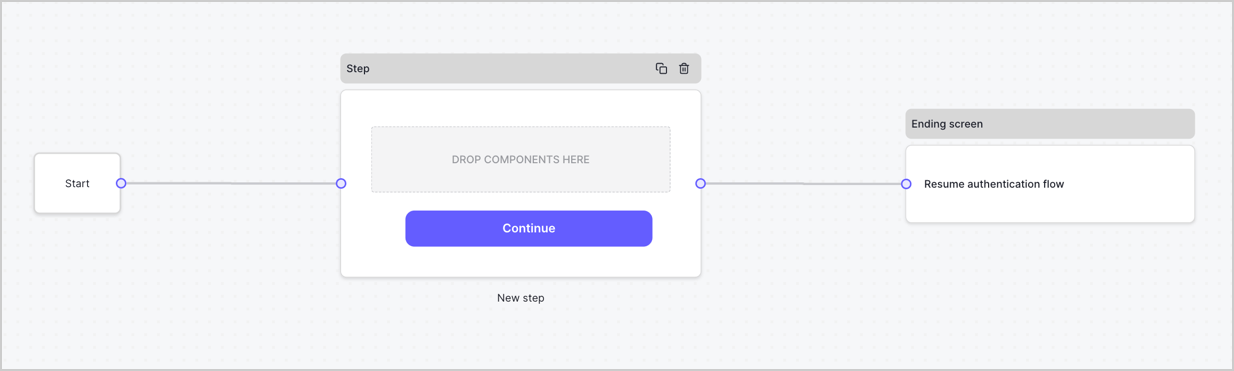
By default, a new form contains a Start node, a Step node, and an Ending screen node.
<Frame>
  <img src="https://mintcdn.com/docs-dev-feat-sdk-reference-docs/cH8SproRs4WJoPzC/docs/images/cdy7uua7fh8z/2TZ9jSjgEcARFpULI6hz4R/a4319a1bd482f2ee5cc23100fdb2f42c/New-form-Forms-for-action-use-case.png?fit=max&auto=format&n=cH8SproRs4WJoPzC&q=85&s=08be40c1b5089331e5bd09f7ccb1c771" alt="Dashboard > Forms > Use Cases > Form" data-og-width="1234" width="1234" data-og-height="371" height="371" data-path="docs/images/cdy7uua7fh8z/2TZ9jSjgEcARFpULI6hz4R/a4319a1bd482f2ee5cc23100fdb2f42c/New-form-Forms-for-action-use-case.png" data-optimize="true" data-opv="3" srcset="https://mintcdn.com/docs-dev-feat-sdk-reference-docs/cH8SproRs4WJoPzC/docs/images/cdy7uua7fh8z/2TZ9jSjgEcARFpULI6hz4R/a4319a1bd482f2ee5cc23100fdb2f42c/New-form-Forms-for-action-use-case.png?w=280&fit=max&auto=format&n=cH8SproRs4WJoPzC&q=85&s=d891e85952448b4d229136474fb4d613 280w, https://mintcdn.com/docs-dev-feat-sdk-reference-docs/cH8SproRs4WJoPzC/docs/images/cdy7uua7fh8z/2TZ9jSjgEcARFpULI6hz4R/a4319a1bd482f2ee5cc23100fdb2f42c/New-form-Forms-for-action-use-case.png?w=560&fit=max&auto=format&n=cH8SproRs4WJoPzC&q=85&s=8e348e5c54ec54bc5d12326d37fcb3b1 560w, https://mintcdn.com/docs-dev-feat-sdk-reference-docs/cH8SproRs4WJoPzC/docs/images/cdy7uua7fh8z/2TZ9jSjgEcARFpULI6hz4R/a4319a1bd482f2ee5cc23100fdb2f42c/New-form-Forms-for-action-use-case.png?w=840&fit=max&auto=format&n=cH8SproRs4WJoPzC&q=85&s=845f8fd9d727c2f2ef8ed7ad53a7d20e 840w, https://mintcdn.com/docs-dev-feat-sdk-reference-docs/cH8SproRs4WJoPzC/docs/images/cdy7uua7fh8z/2TZ9jSjgEcARFpULI6hz4R/a4319a1bd482f2ee5cc23100fdb2f42c/New-form-Forms-for-action-use-case.png?w=1100&fit=max&auto=format&n=cH8SproRs4WJoPzC&q=85&s=839f90bbb199599b1cb859905d4e8c3c 1100w, https://mintcdn.com/docs-dev-feat-sdk-reference-docs/cH8SproRs4WJoPzC/docs/images/cdy7uua7fh8z/2TZ9jSjgEcARFpULI6hz4R/a4319a1bd482f2ee5cc23100fdb2f42c/New-form-Forms-for-action-use-case.png?w=1650&fit=max&auto=format&n=cH8SproRs4WJoPzC&q=85&s=1fbd04607f7315ab4f3d26038938e063 1650w, https://mintcdn.com/docs-dev-feat-sdk-reference-docs/cH8SproRs4WJoPzC/docs/images/cdy7uua7fh8z/2TZ9jSjgEcARFpULI6hz4R/a4319a1bd482f2ee5cc23100fdb2f42c/New-form-Forms-for-action-use-case.png?w=2500&fit=max&auto=format&n=cH8SproRs4WJoPzC&q=85&s=2f6056c38310189da626687286c630fc 2500w" />
</Frame>

### Configure the Step node

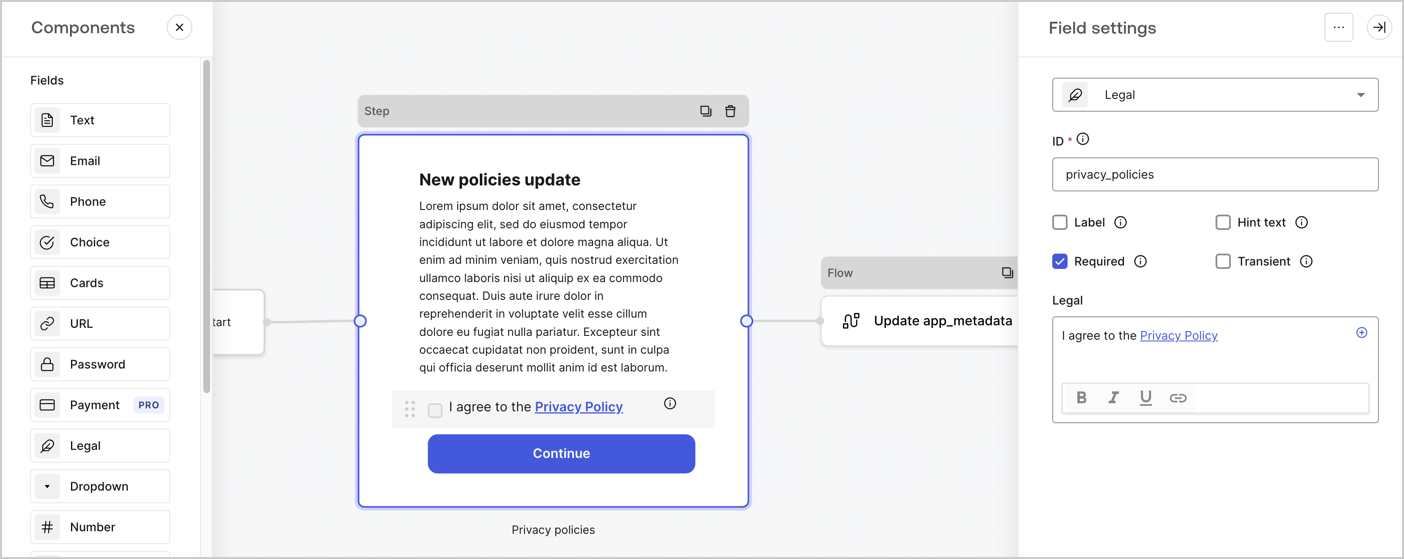
The Step node is the graphical interface visible to users. Add [Fields](/docs/customize/forms/nodes-and-components) to the Step node to collect the new agreement acceptance value by following these steps:

1. Drag a **Rich text** field from the **Components menu** into the **Step** node.

   * **Rich text**: Enter a description of your privacy policies updates.
   * Select **Save**.
2. Drag a **Legal** field into the **Step** node.

   * **ID**: Enter `privacy_policies`.
   * **Required**: Enable the checkbox.
   * **Legal**: Enter `I agree to the Privacy Policy`.
   * Select **Save**.
3. Select **Publish** to save.
<Frame>
  <img src="https://mintcdn.com/docs-dev-feat-sdk-reference-docs/FaH4AVZw-B21Gt8Q/docs/images/cdy7uua7fh8z/59zFFjQjAnjogkc2QGIqqJ/0ad66b1b636544122aa4e65968b76c2c/privacy-policy-step-node.png?fit=max&auto=format&n=FaH4AVZw-B21Gt8Q&q=85&s=61abf1cdad0d409ea3fcd7087a228625" alt="Dashboard > Actions > Forms > Use case privacy policy step node" data-og-width="1404" width="1404" data-og-height="559" height="559" data-path="docs/images/cdy7uua7fh8z/59zFFjQjAnjogkc2QGIqqJ/0ad66b1b636544122aa4e65968b76c2c/privacy-policy-step-node.png" data-optimize="true" data-opv="3" srcset="https://mintcdn.com/docs-dev-feat-sdk-reference-docs/FaH4AVZw-B21Gt8Q/docs/images/cdy7uua7fh8z/59zFFjQjAnjogkc2QGIqqJ/0ad66b1b636544122aa4e65968b76c2c/privacy-policy-step-node.png?w=280&fit=max&auto=format&n=FaH4AVZw-B21Gt8Q&q=85&s=30ec85596dc9ba695f4aa3a8a32e2012 280w, https://mintcdn.com/docs-dev-feat-sdk-reference-docs/FaH4AVZw-B21Gt8Q/docs/images/cdy7uua7fh8z/59zFFjQjAnjogkc2QGIqqJ/0ad66b1b636544122aa4e65968b76c2c/privacy-policy-step-node.png?w=560&fit=max&auto=format&n=FaH4AVZw-B21Gt8Q&q=85&s=344b414b0c63aa763ca37e5111ae3b6f 560w, https://mintcdn.com/docs-dev-feat-sdk-reference-docs/FaH4AVZw-B21Gt8Q/docs/images/cdy7uua7fh8z/59zFFjQjAnjogkc2QGIqqJ/0ad66b1b636544122aa4e65968b76c2c/privacy-policy-step-node.png?w=840&fit=max&auto=format&n=FaH4AVZw-B21Gt8Q&q=85&s=4ac751fe014e9fc08bb1aae180d09228 840w, https://mintcdn.com/docs-dev-feat-sdk-reference-docs/FaH4AVZw-B21Gt8Q/docs/images/cdy7uua7fh8z/59zFFjQjAnjogkc2QGIqqJ/0ad66b1b636544122aa4e65968b76c2c/privacy-policy-step-node.png?w=1100&fit=max&auto=format&n=FaH4AVZw-B21Gt8Q&q=85&s=5b3bb9dcf9f65e957d70521f98b78764 1100w, https://mintcdn.com/docs-dev-feat-sdk-reference-docs/FaH4AVZw-B21Gt8Q/docs/images/cdy7uua7fh8z/59zFFjQjAnjogkc2QGIqqJ/0ad66b1b636544122aa4e65968b76c2c/privacy-policy-step-node.png?w=1650&fit=max&auto=format&n=FaH4AVZw-B21Gt8Q&q=85&s=abe4837f705959966e9272ddc291346c 1650w, https://mintcdn.com/docs-dev-feat-sdk-reference-docs/FaH4AVZw-B21Gt8Q/docs/images/cdy7uua7fh8z/59zFFjQjAnjogkc2QGIqqJ/0ad66b1b636544122aa4e65968b76c2c/privacy-policy-step-node.png?w=2500&fit=max&auto=format&n=FaH4AVZw-B21Gt8Q&q=85&s=0bffc0fe93a831e076aa3ec1f9a83b18 2500w" />
</Frame>

### Configure the Flow node

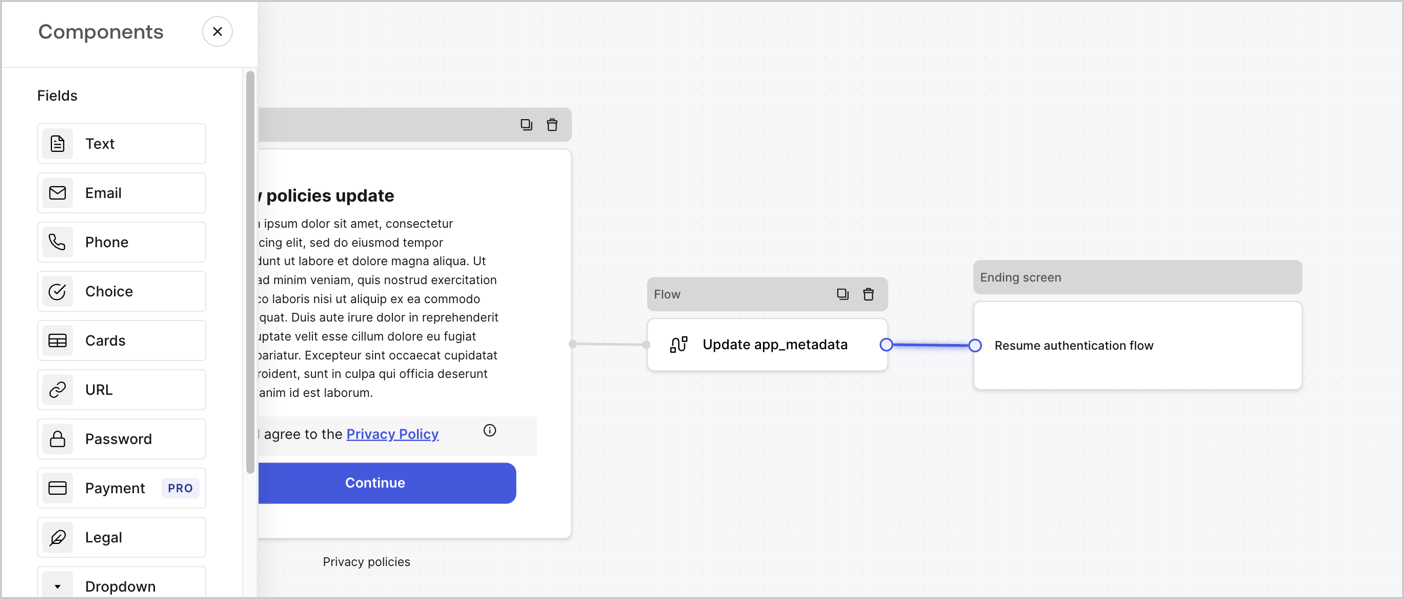
Add a **Flow** node after the **Step** node to update the `app_metadata` and resume the authentication flow by following these steps:

1. Select **Flow** from the bottom of the Form editor.
2. Remove the existing link between the **Step** and **Ending Screen** nodes.
3. Select the new **Flow** > **Click to add a flow** > **Create a new flow.**

   * Enter `Update app_metadata` in the **Name** field.
   * Select **Create**.
   * Select **Save**.
4. Link the **Flow** node to the **Step** and **Ending Screen** nodes as pictured below.
5. Select **Publish** to save.
<Frame>
  <img src="https://mintcdn.com/docs-dev-feat-sdk-reference-docs/0tYOZc0OW-lAvvrU/docs/images/cdy7uua7fh8z/6YIkzm7SrpM9LW76AXuRzh/353c518fe82bbaa440836da1d83596d6/link-policies.png?fit=max&auto=format&n=0tYOZc0OW-lAvvrU&q=85&s=8f0a7e232218e223168e2dadf2412d5f" alt="Dashboard > Actions > Forms > Form" data-og-width="1404" width="1404" data-og-height="599" height="599" data-path="docs/images/cdy7uua7fh8z/6YIkzm7SrpM9LW76AXuRzh/353c518fe82bbaa440836da1d83596d6/link-policies.png" data-optimize="true" data-opv="3" srcset="https://mintcdn.com/docs-dev-feat-sdk-reference-docs/0tYOZc0OW-lAvvrU/docs/images/cdy7uua7fh8z/6YIkzm7SrpM9LW76AXuRzh/353c518fe82bbaa440836da1d83596d6/link-policies.png?w=280&fit=max&auto=format&n=0tYOZc0OW-lAvvrU&q=85&s=08a7be9ebe18a4bb3ad053cdaf2a1a39 280w, https://mintcdn.com/docs-dev-feat-sdk-reference-docs/0tYOZc0OW-lAvvrU/docs/images/cdy7uua7fh8z/6YIkzm7SrpM9LW76AXuRzh/353c518fe82bbaa440836da1d83596d6/link-policies.png?w=560&fit=max&auto=format&n=0tYOZc0OW-lAvvrU&q=85&s=31b265f9fae9385ab6d23f366932498d 560w, https://mintcdn.com/docs-dev-feat-sdk-reference-docs/0tYOZc0OW-lAvvrU/docs/images/cdy7uua7fh8z/6YIkzm7SrpM9LW76AXuRzh/353c518fe82bbaa440836da1d83596d6/link-policies.png?w=840&fit=max&auto=format&n=0tYOZc0OW-lAvvrU&q=85&s=e5971851768c33849f681ac038c33788 840w, https://mintcdn.com/docs-dev-feat-sdk-reference-docs/0tYOZc0OW-lAvvrU/docs/images/cdy7uua7fh8z/6YIkzm7SrpM9LW76AXuRzh/353c518fe82bbaa440836da1d83596d6/link-policies.png?w=1100&fit=max&auto=format&n=0tYOZc0OW-lAvvrU&q=85&s=d0443ccedb4bccd9ce10df5c8a14f1eb 1100w, https://mintcdn.com/docs-dev-feat-sdk-reference-docs/0tYOZc0OW-lAvvrU/docs/images/cdy7uua7fh8z/6YIkzm7SrpM9LW76AXuRzh/353c518fe82bbaa440836da1d83596d6/link-policies.png?w=1650&fit=max&auto=format&n=0tYOZc0OW-lAvvrU&q=85&s=5357997bae827d7bdf2516c803771b87 1650w, https://mintcdn.com/docs-dev-feat-sdk-reference-docs/0tYOZc0OW-lAvvrU/docs/images/cdy7uua7fh8z/6YIkzm7SrpM9LW76AXuRzh/353c518fe82bbaa440836da1d83596d6/link-policies.png?w=2500&fit=max&auto=format&n=0tYOZc0OW-lAvvrU&q=85&s=1707858fb5c45a61f2f30ee8f2b3850b 2500w" />
</Frame>

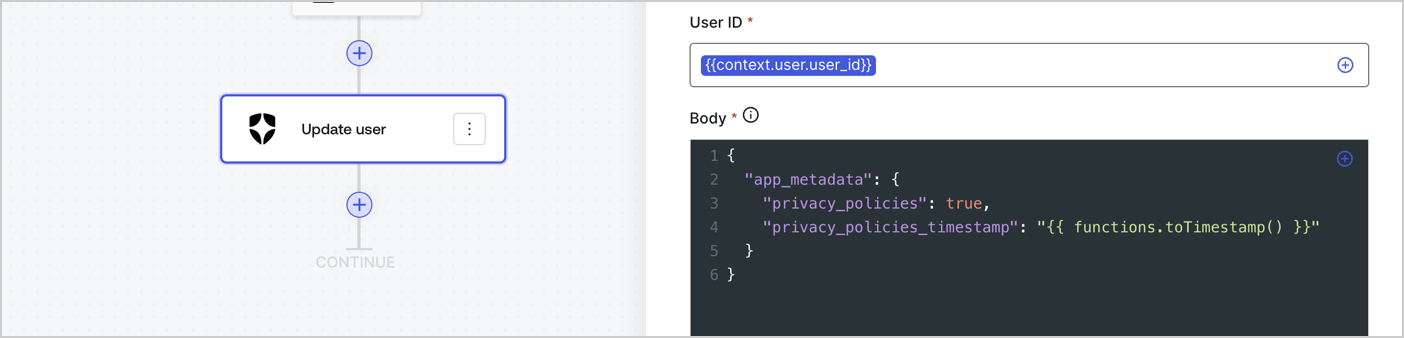
Add an Auth0 Update user action to the flow by following these steps:

1. Select the **Flow** **Update app\_metadata** > **Edit flow** to open the Flow editor in a new tab.
2. Below the StartAction, select the **+** icon to add an **Update user** action. Complete the fields below, then select **Save** to continue.

   * **Connection**: Select from the dropdown the Vault connection to your M2M application.

   * **User ID**: Enter `{{context.user.user_id}}`.

   * **Body**: Copy and paste the following code to update the app\_metadata with the privacy\_policies and privacy\_policies\_timestamp properties.

     ```text lines theme={null}
     {
       "app_metadata": {
         "privacy_policies": true,
         "privacy_policies_timestamp": "{{ functions.toTimestamp() }}"
       }
     }
     ```

   * Select **Save**.
3. Select **Publish** to save.
<Frame>
  <img src="https://mintcdn.com/docs-dev-feat-sdk-reference-docs/wbt6kjT68ecuXhM6/docs/images/cdy7uua7fh8z/CvMNIwWrOUwaFW4X3G28p/1fb70ae57a20749d9ffaaba8dc0b7e26/update-user-privacy.png?fit=max&auto=format&n=wbt6kjT68ecuXhM6&q=85&s=1045b6d722a5164463b627b13a8eb2f5" alt="Dashboard > Actions > Forms > User case privacy policy code" data-og-width="1404" width="1404" data-og-height="338" height="338" data-path="docs/images/cdy7uua7fh8z/CvMNIwWrOUwaFW4X3G28p/1fb70ae57a20749d9ffaaba8dc0b7e26/update-user-privacy.png" data-optimize="true" data-opv="3" srcset="https://mintcdn.com/docs-dev-feat-sdk-reference-docs/wbt6kjT68ecuXhM6/docs/images/cdy7uua7fh8z/CvMNIwWrOUwaFW4X3G28p/1fb70ae57a20749d9ffaaba8dc0b7e26/update-user-privacy.png?w=280&fit=max&auto=format&n=wbt6kjT68ecuXhM6&q=85&s=2aa7682653cb917506f9f8f898ac6386 280w, https://mintcdn.com/docs-dev-feat-sdk-reference-docs/wbt6kjT68ecuXhM6/docs/images/cdy7uua7fh8z/CvMNIwWrOUwaFW4X3G28p/1fb70ae57a20749d9ffaaba8dc0b7e26/update-user-privacy.png?w=560&fit=max&auto=format&n=wbt6kjT68ecuXhM6&q=85&s=6c0486bea2b110c3aa76a7c39584d72d 560w, https://mintcdn.com/docs-dev-feat-sdk-reference-docs/wbt6kjT68ecuXhM6/docs/images/cdy7uua7fh8z/CvMNIwWrOUwaFW4X3G28p/1fb70ae57a20749d9ffaaba8dc0b7e26/update-user-privacy.png?w=840&fit=max&auto=format&n=wbt6kjT68ecuXhM6&q=85&s=e99a542a380bd54f94878343d624afbe 840w, https://mintcdn.com/docs-dev-feat-sdk-reference-docs/wbt6kjT68ecuXhM6/docs/images/cdy7uua7fh8z/CvMNIwWrOUwaFW4X3G28p/1fb70ae57a20749d9ffaaba8dc0b7e26/update-user-privacy.png?w=1100&fit=max&auto=format&n=wbt6kjT68ecuXhM6&q=85&s=eeace3125cdaf226b6b809de3b187c67 1100w, https://mintcdn.com/docs-dev-feat-sdk-reference-docs/wbt6kjT68ecuXhM6/docs/images/cdy7uua7fh8z/CvMNIwWrOUwaFW4X3G28p/1fb70ae57a20749d9ffaaba8dc0b7e26/update-user-privacy.png?w=1650&fit=max&auto=format&n=wbt6kjT68ecuXhM6&q=85&s=86d65c831f4ad49b87708ec58300a497 1650w, https://mintcdn.com/docs-dev-feat-sdk-reference-docs/wbt6kjT68ecuXhM6/docs/images/cdy7uua7fh8z/CvMNIwWrOUwaFW4X3G28p/1fb70ae57a20749d9ffaaba8dc0b7e26/update-user-privacy.png?w=2500&fit=max&auto=format&n=wbt6kjT68ecuXhM6&q=85&s=0d43c21de837b4f7d439898039a6943e 2500w" />
</Frame>

<Callout icon="file-lines" color="#0EA5E9" iconType="regular">
  The flow **Update app\_metadata** adds a `privacy_policies true` value to the app`_metadata` object and also generates a timestamp with a [helper function.](/docs/customize/forms/variables)
</Callout>

## Retrieve the form render code

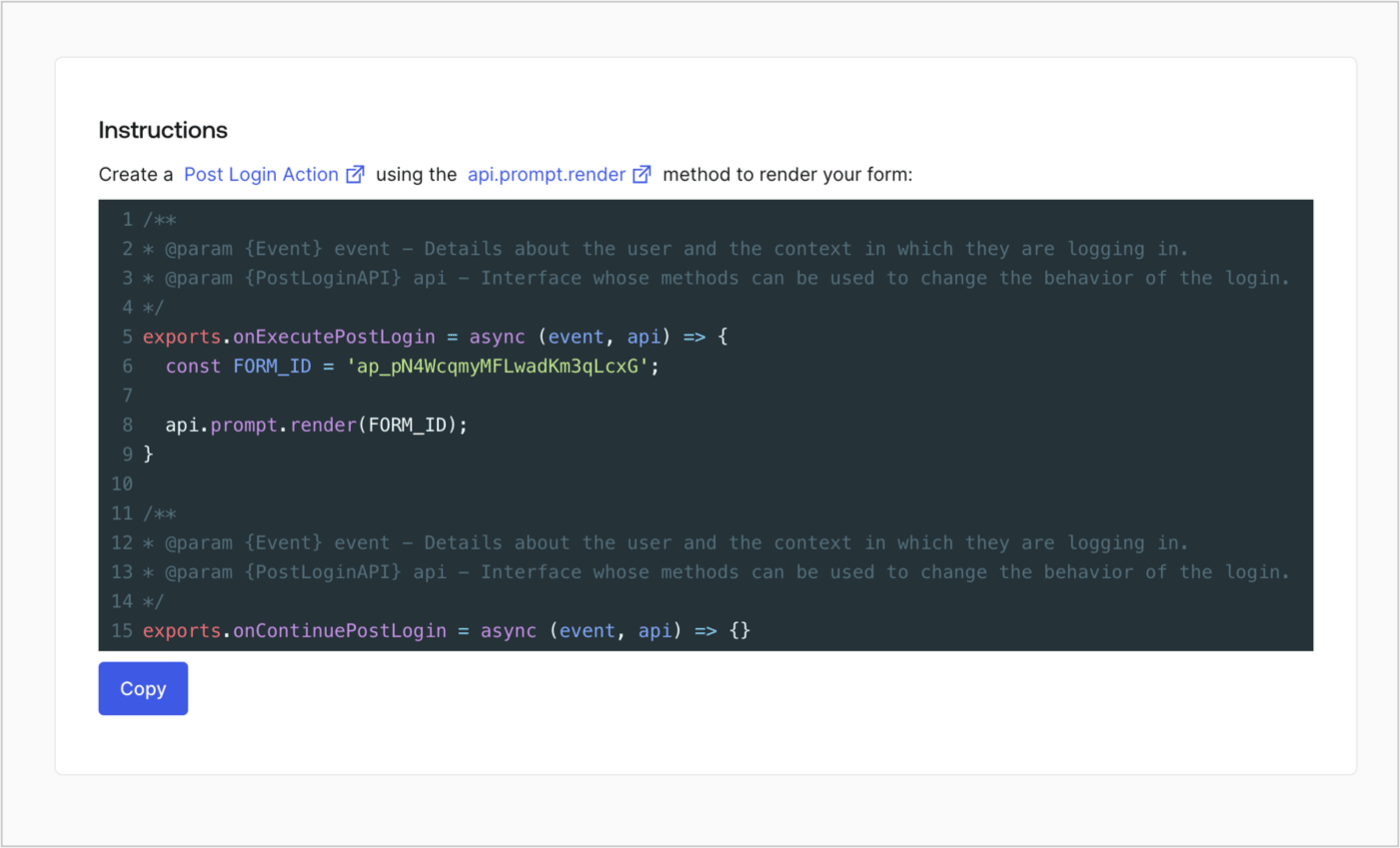
Retrieve your form render code to visually render the form with a custom Post Login Action by following these steps:

* From the Form editor, select **`<> Render`**.
* Select **Copy**.
<Frame>
  <img src="https://mintcdn.com/docs-dev-feat-sdk-reference-docs/cH8SproRs4WJoPzC/docs/images/cdy7uua7fh8z/2EIUzc539sq9lwoTKbjoJv/496a864c0fc44a782c9cadca119dbfb0/embed.png?fit=max&auto=format&n=cH8SproRs4WJoPzC&q=85&s=0348bac1e775dd1f0aa44781a4396182" alt="Dashboard > Actions > Forms > Form > Embed" data-og-width="1400" width="1400" data-og-height="848" height="848" data-path="docs/images/cdy7uua7fh8z/2EIUzc539sq9lwoTKbjoJv/496a864c0fc44a782c9cadca119dbfb0/embed.png" data-optimize="true" data-opv="3" srcset="https://mintcdn.com/docs-dev-feat-sdk-reference-docs/cH8SproRs4WJoPzC/docs/images/cdy7uua7fh8z/2EIUzc539sq9lwoTKbjoJv/496a864c0fc44a782c9cadca119dbfb0/embed.png?w=280&fit=max&auto=format&n=cH8SproRs4WJoPzC&q=85&s=802852de44d78919f4584a26cb23c4e0 280w, https://mintcdn.com/docs-dev-feat-sdk-reference-docs/cH8SproRs4WJoPzC/docs/images/cdy7uua7fh8z/2EIUzc539sq9lwoTKbjoJv/496a864c0fc44a782c9cadca119dbfb0/embed.png?w=560&fit=max&auto=format&n=cH8SproRs4WJoPzC&q=85&s=e1b310b92564c814b461ae84dd8c28ea 560w, https://mintcdn.com/docs-dev-feat-sdk-reference-docs/cH8SproRs4WJoPzC/docs/images/cdy7uua7fh8z/2EIUzc539sq9lwoTKbjoJv/496a864c0fc44a782c9cadca119dbfb0/embed.png?w=840&fit=max&auto=format&n=cH8SproRs4WJoPzC&q=85&s=b01e1d3f7b2f77a5f94e5cfbff037d64 840w, https://mintcdn.com/docs-dev-feat-sdk-reference-docs/cH8SproRs4WJoPzC/docs/images/cdy7uua7fh8z/2EIUzc539sq9lwoTKbjoJv/496a864c0fc44a782c9cadca119dbfb0/embed.png?w=1100&fit=max&auto=format&n=cH8SproRs4WJoPzC&q=85&s=c480cd04c9b0aeb04c40483ce89030be 1100w, https://mintcdn.com/docs-dev-feat-sdk-reference-docs/cH8SproRs4WJoPzC/docs/images/cdy7uua7fh8z/2EIUzc539sq9lwoTKbjoJv/496a864c0fc44a782c9cadca119dbfb0/embed.png?w=1650&fit=max&auto=format&n=cH8SproRs4WJoPzC&q=85&s=23bf784e6b78d3b38dbda763eb7013f9 1650w, https://mintcdn.com/docs-dev-feat-sdk-reference-docs/cH8SproRs4WJoPzC/docs/images/cdy7uua7fh8z/2EIUzc539sq9lwoTKbjoJv/496a864c0fc44a782c9cadca119dbfb0/embed.png?w=2500&fit=max&auto=format&n=cH8SproRs4WJoPzC&q=85&s=1776116eaf817fa922dd110673279f9e 2500w" />
</Frame>

## Create a Post Login Action

Create a post-login Action to render your form by following these steps:

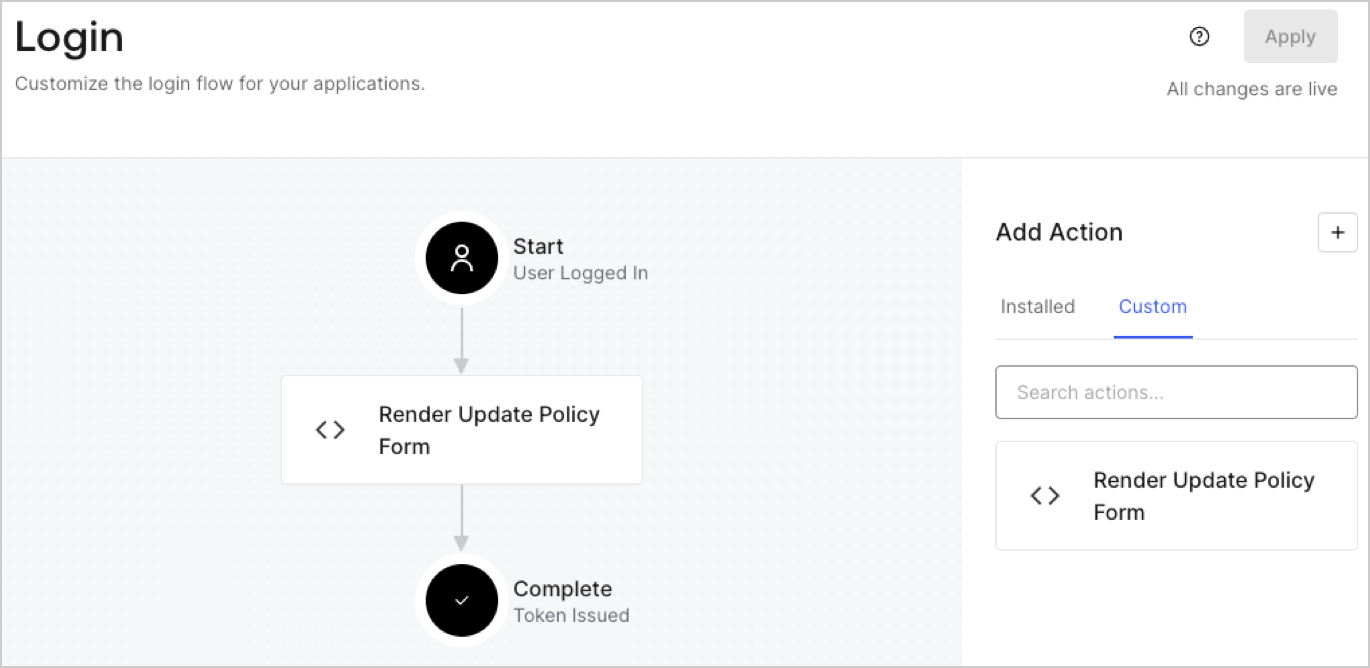
1. Navigate to **Auth0 Dashboard > Actions > Flows > Login.**
2. Select the **+** icon and Select **Build from scratch**:

   * **Name**: Enter `Render Update Policy Form`.
   * **Trigger**: Select `Login / Post Login`.
   * **Runtime**: Select the recommended version.
3. Select **Create**.

To configure the post-login Action:

1. Delete the existing code from the Code editor.
2. Paste the form render code into the Code editor.
3. Edit the code to define the conditional logic that will render the form.

   ```javascript lines theme={null}
   /**
   * @param {Event} event - Details about the user and the context in which they are logging in.
   * @param {PostLoginAPI} api - Interface whose methods can be used to change the behavior of the login.
   */
   exports.onExecutePostLogin = async (event, api) => {
     const FORM_ID = 'REPLACE_WITH_YOUR_FORM_ID';

     if (event.user.app_metadata.privacy_policies !== true) {
       api.prompt.render(FORM_ID);
     }
   }

   exports.onContinuePostLogin = async (event, api) => { }
   ```

   <Callout icon="file-lines" color="#0EA5E9" iconType="regular">
     The example code above will render the form when a user is missing the app metadata `privacy_policies` property.
   </Callout>
4. Select **Deploy.**
5. Drag and Drop the **Render Update Policy Form** Action to the **Login** flow.
   <Frame>
     <img src="https://mintcdn.com/docs-dev-feat-sdk-reference-docs/FaH4AVZw-B21Gt8Q/docs/images/cdy7uua7fh8z/5TOwDgevZsBqd7yZynUYWU/41ca909dc3007aed4f40ff794a05efa5/postlogin.png?fit=max&auto=format&n=FaH4AVZw-B21Gt8Q&q=85&s=872c75d02199d1ca091bb4eae985d484" alt="Dashboard > Forms > Use Case > Render update policy form login action" data-og-width="1370" width="1370" data-og-height="668" height="668" data-path="docs/images/cdy7uua7fh8z/5TOwDgevZsBqd7yZynUYWU/41ca909dc3007aed4f40ff794a05efa5/postlogin.png" data-optimize="true" data-opv="3" srcset="https://mintcdn.com/docs-dev-feat-sdk-reference-docs/FaH4AVZw-B21Gt8Q/docs/images/cdy7uua7fh8z/5TOwDgevZsBqd7yZynUYWU/41ca909dc3007aed4f40ff794a05efa5/postlogin.png?w=280&fit=max&auto=format&n=FaH4AVZw-B21Gt8Q&q=85&s=b79b4e8ffbe19103091a08b2aef60e02 280w, https://mintcdn.com/docs-dev-feat-sdk-reference-docs/FaH4AVZw-B21Gt8Q/docs/images/cdy7uua7fh8z/5TOwDgevZsBqd7yZynUYWU/41ca909dc3007aed4f40ff794a05efa5/postlogin.png?w=560&fit=max&auto=format&n=FaH4AVZw-B21Gt8Q&q=85&s=78f555775ec177381d7ea5d4f84b9798 560w, https://mintcdn.com/docs-dev-feat-sdk-reference-docs/FaH4AVZw-B21Gt8Q/docs/images/cdy7uua7fh8z/5TOwDgevZsBqd7yZynUYWU/41ca909dc3007aed4f40ff794a05efa5/postlogin.png?w=840&fit=max&auto=format&n=FaH4AVZw-B21Gt8Q&q=85&s=206d28f971153238a9731b85f3a6f55a 840w, https://mintcdn.com/docs-dev-feat-sdk-reference-docs/FaH4AVZw-B21Gt8Q/docs/images/cdy7uua7fh8z/5TOwDgevZsBqd7yZynUYWU/41ca909dc3007aed4f40ff794a05efa5/postlogin.png?w=1100&fit=max&auto=format&n=FaH4AVZw-B21Gt8Q&q=85&s=2d42ef7e3ca924603fb6247a2c007538 1100w, https://mintcdn.com/docs-dev-feat-sdk-reference-docs/FaH4AVZw-B21Gt8Q/docs/images/cdy7uua7fh8z/5TOwDgevZsBqd7yZynUYWU/41ca909dc3007aed4f40ff794a05efa5/postlogin.png?w=1650&fit=max&auto=format&n=FaH4AVZw-B21Gt8Q&q=85&s=5591ae537fb9aef02e1bf041c6094f07 1650w, https://mintcdn.com/docs-dev-feat-sdk-reference-docs/FaH4AVZw-B21Gt8Q/docs/images/cdy7uua7fh8z/5TOwDgevZsBqd7yZynUYWU/41ca909dc3007aed4f40ff794a05efa5/postlogin.png?w=2500&fit=max&auto=format&n=FaH4AVZw-B21Gt8Q&q=85&s=ed1f6c4ddba521d440821c062c6c08e1 2500w" />
   </Frame>
6. Select **Apply.**

### Test implementation

Test the implementation by following these steps:

1. Log in with an existing user whose app`_metadata` attribute `privacy_policies` does not have a value.
2. The post-login Action in the Login flow will render the form and prompt for acceptance.
3. Select **Auth0 Dashboard > User Management > Users,** locate the user and verify that the `app_metadata` attribute `privacy_policies` contains a `true` value and a timestamp.
