> ## Documentation Index
> Fetch the complete documentation index at: https://docs-dev-feat-sdk-reference-docs.mintlify.site/llms.txt
> Use this file to discover all available pages before exploring further.

> Apprenez à configurer un formulaire de profil progressif à l’aide de Forms for Actions

# Cas d’utilisation : configurer un formulaire de profil progressif avec Forms

<Card title="Avant de commencer">
  1. Créez une [application machine-to-machine](/docs/fr-ca/get-started/auth0-overview/create-applications/machine-to-machine-apps) avec les portées suivantes activées :

  * `read:users`
  * `update:users`
  * `create:users`
  * `read:users_app_metadata`
  * `update:users_app_metadata`
  * `create:users_app_metadata`

  2. Ajoutez une [connexion Vault](/docs/fr-ca/customize/forms/vault) à l’aide des informations d’identification de l’application M2M.
</Card>

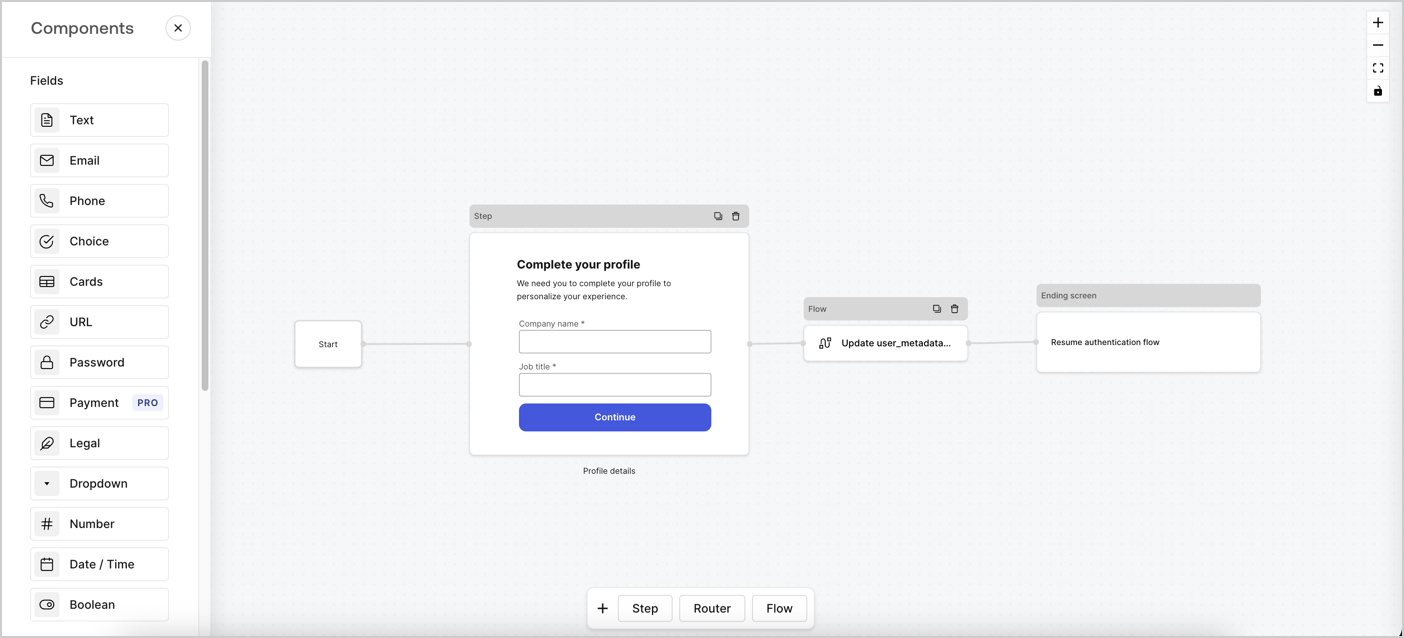
Forms for Actions vous permet de créer des flux de profil progressif afin de déterminer à quel moment demander aux utilisateurs de fournir les renseignements manquants, comme le nom de l’entreprise et le titre du poste, et de les stocker comme attributs `user_metadata`.
<Frame>
  <img src="https://mintcdn.com/docs-dev-feat-sdk-reference-docs/8mFNllJO8zv9wchk/docs/images/cdy7uua7fh8z/xUx9YmnHvnAqL19JvNtNP/60dae88f893d4ebe8e3523421e960596/Progressive-profle-overview.png?fit=max&auto=format&n=8mFNllJO8zv9wchk&q=85&s=9deb680cae56eb5ca50c387131f460c5" alt="Dashboard > Actions > Forms > Form" data-og-width="1404" width="1404" data-og-height="638" height="638" data-path="docs/images/cdy7uua7fh8z/xUx9YmnHvnAqL19JvNtNP/60dae88f893d4ebe8e3523421e960596/Progressive-profle-overview.png" data-optimize="true" data-opv="3" srcset="https://mintcdn.com/docs-dev-feat-sdk-reference-docs/8mFNllJO8zv9wchk/docs/images/cdy7uua7fh8z/xUx9YmnHvnAqL19JvNtNP/60dae88f893d4ebe8e3523421e960596/Progressive-profle-overview.png?w=280&fit=max&auto=format&n=8mFNllJO8zv9wchk&q=85&s=bc88f07767cd5dc5f02e4e63d6b64270 280w, https://mintcdn.com/docs-dev-feat-sdk-reference-docs/8mFNllJO8zv9wchk/docs/images/cdy7uua7fh8z/xUx9YmnHvnAqL19JvNtNP/60dae88f893d4ebe8e3523421e960596/Progressive-profle-overview.png?w=560&fit=max&auto=format&n=8mFNllJO8zv9wchk&q=85&s=3ebd5ac195adc95d0e5cbbfcb337ef3e 560w, https://mintcdn.com/docs-dev-feat-sdk-reference-docs/8mFNllJO8zv9wchk/docs/images/cdy7uua7fh8z/xUx9YmnHvnAqL19JvNtNP/60dae88f893d4ebe8e3523421e960596/Progressive-profle-overview.png?w=840&fit=max&auto=format&n=8mFNllJO8zv9wchk&q=85&s=12edb010920430991eabc8c91e4a72a7 840w, https://mintcdn.com/docs-dev-feat-sdk-reference-docs/8mFNllJO8zv9wchk/docs/images/cdy7uua7fh8z/xUx9YmnHvnAqL19JvNtNP/60dae88f893d4ebe8e3523421e960596/Progressive-profle-overview.png?w=1100&fit=max&auto=format&n=8mFNllJO8zv9wchk&q=85&s=cc25f4c9eb03ed18726f12784935ec66 1100w, https://mintcdn.com/docs-dev-feat-sdk-reference-docs/8mFNllJO8zv9wchk/docs/images/cdy7uua7fh8z/xUx9YmnHvnAqL19JvNtNP/60dae88f893d4ebe8e3523421e960596/Progressive-profle-overview.png?w=1650&fit=max&auto=format&n=8mFNllJO8zv9wchk&q=85&s=c5568e335b19f20bf0aa63b88840339d 1650w, https://mintcdn.com/docs-dev-feat-sdk-reference-docs/8mFNllJO8zv9wchk/docs/images/cdy7uua7fh8z/xUx9YmnHvnAqL19JvNtNP/60dae88f893d4ebe8e3523421e960596/Progressive-profle-overview.png?w=2500&fit=max&auto=format&n=8mFNllJO8zv9wchk&q=85&s=88f6232fb787ca41e16f839a940151f3 2500w" />
</Frame>

Les sections ci-dessous expliquent comment créer un formulaire de profil progressif à l’aide de nœuds et de flux, ainsi que les étapes à suivre pour ajouter votre formulaire à une [Action Post Login](/docs/fr-ca/customize/actions/explore-triggers/signup-and-login-triggers/login-trigger).

<h2 id="create-a-form-from-scratch">
  Créer un formulaire à partir de zéro
</h2>

Suivez ces étapes pour créer un formulaire et recueillir des renseignements :

1. Ouvrez l’éditeur de formulaires en sélectionnant **Auth0 Dashboard > Actions > Forms.**
2. Sélectionnez **Create Form** > **Start from scratch**.

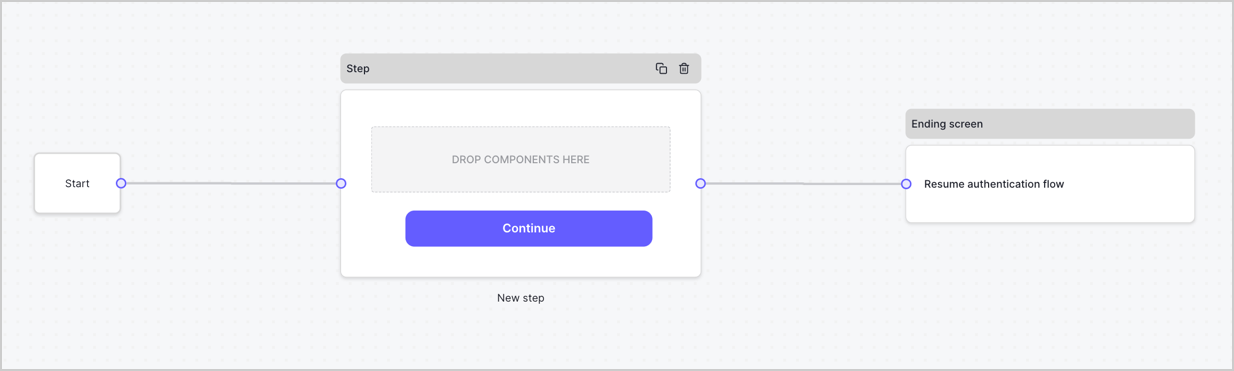
Par défaut, un nouveau formulaire contient un nœud Start, un nœud Step et un nœud Ending screen.
<Frame>
  <img src="https://mintcdn.com/docs-dev-feat-sdk-reference-docs/cH8SproRs4WJoPzC/docs/images/cdy7uua7fh8z/2TZ9jSjgEcARFpULI6hz4R/a4319a1bd482f2ee5cc23100fdb2f42c/New-form-Forms-for-action-use-case.png?fit=max&auto=format&n=cH8SproRs4WJoPzC&q=85&s=08be40c1b5089331e5bd09f7ccb1c771" alt="Dashboard > Forms > Cas d’utilisation > Formulaire" data-og-width="1234" width="1234" data-og-height="371" height="371" data-path="docs/images/cdy7uua7fh8z/2TZ9jSjgEcARFpULI6hz4R/a4319a1bd482f2ee5cc23100fdb2f42c/New-form-Forms-for-action-use-case.png" data-optimize="true" data-opv="3" srcset="https://mintcdn.com/docs-dev-feat-sdk-reference-docs/cH8SproRs4WJoPzC/docs/images/cdy7uua7fh8z/2TZ9jSjgEcARFpULI6hz4R/a4319a1bd482f2ee5cc23100fdb2f42c/New-form-Forms-for-action-use-case.png?w=280&fit=max&auto=format&n=cH8SproRs4WJoPzC&q=85&s=d891e85952448b4d229136474fb4d613 280w, https://mintcdn.com/docs-dev-feat-sdk-reference-docs/cH8SproRs4WJoPzC/docs/images/cdy7uua7fh8z/2TZ9jSjgEcARFpULI6hz4R/a4319a1bd482f2ee5cc23100fdb2f42c/New-form-Forms-for-action-use-case.png?w=560&fit=max&auto=format&n=cH8SproRs4WJoPzC&q=85&s=8e348e5c54ec54bc5d12326d37fcb3b1 560w, https://mintcdn.com/docs-dev-feat-sdk-reference-docs/cH8SproRs4WJoPzC/docs/images/cdy7uua7fh8z/2TZ9jSjgEcARFpULI6hz4R/a4319a1bd482f2ee5cc23100fdb2f42c/New-form-Forms-for-action-use-case.png?w=840&fit=max&auto=format&n=cH8SproRs4WJoPzC&q=85&s=845f8fd9d727c2f2ef8ed7ad53a7d20e 840w, https://mintcdn.com/docs-dev-feat-sdk-reference-docs/cH8SproRs4WJoPzC/docs/images/cdy7uua7fh8z/2TZ9jSjgEcARFpULI6hz4R/a4319a1bd482f2ee5cc23100fdb2f42c/New-form-Forms-for-action-use-case.png?w=1100&fit=max&auto=format&n=cH8SproRs4WJoPzC&q=85&s=839f90bbb199599b1cb859905d4e8c3c 1100w, https://mintcdn.com/docs-dev-feat-sdk-reference-docs/cH8SproRs4WJoPzC/docs/images/cdy7uua7fh8z/2TZ9jSjgEcARFpULI6hz4R/a4319a1bd482f2ee5cc23100fdb2f42c/New-form-Forms-for-action-use-case.png?w=1650&fit=max&auto=format&n=cH8SproRs4WJoPzC&q=85&s=1fbd04607f7315ab4f3d26038938e063 1650w, https://mintcdn.com/docs-dev-feat-sdk-reference-docs/cH8SproRs4WJoPzC/docs/images/cdy7uua7fh8z/2TZ9jSjgEcARFpULI6hz4R/a4319a1bd482f2ee5cc23100fdb2f42c/New-form-Forms-for-action-use-case.png?w=2500&fit=max&auto=format&n=cH8SproRs4WJoPzC&q=85&s=2f6056c38310189da626687286c630fc 2500w" />
</Frame>

<h3 id="configure-the-step-node">
  Configurer le nœud Step
</h3>

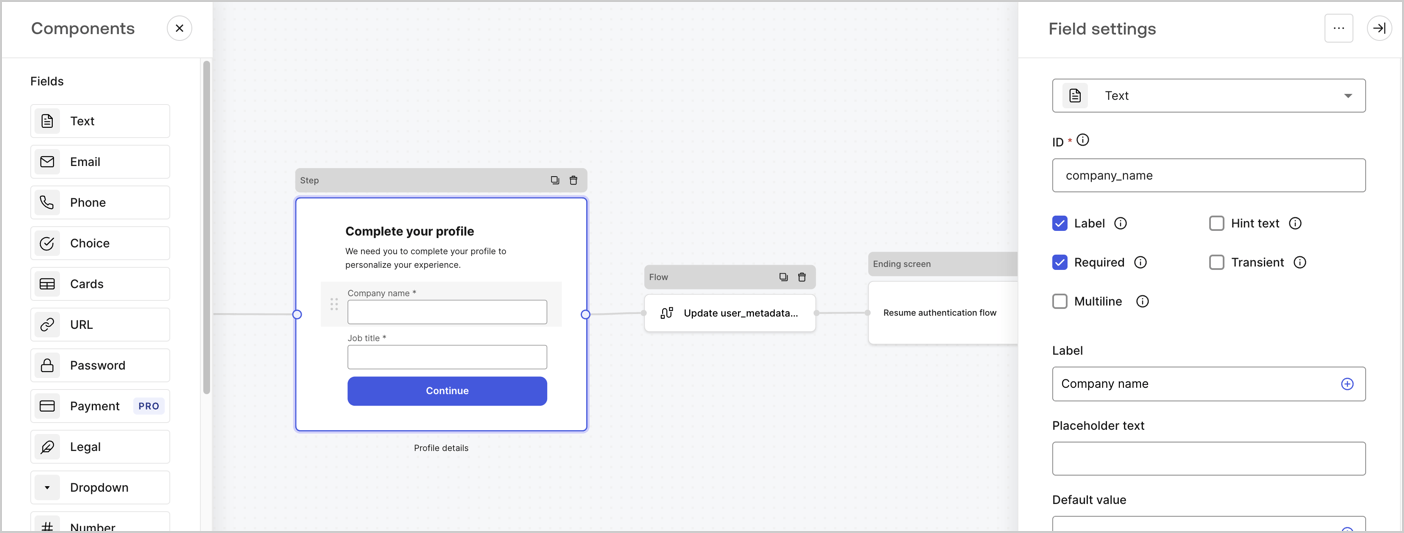
Le nœud Step est l’interface graphique que voient les utilisateurs. Ajoutez des [champs](/docs/fr-ca/customize/forms/nodes-and-components) au nœud Step pour recueillir le nom de l’entreprise et l’intitulé du poste de l’utilisateur en suivant ces étapes :

1. Faites glisser un champ **Rich text** du **menu Components** vers le nœud **Step**.

   * **Rich text** : Saisissez un message personnalisé.

     * **Exemple** : `Complétez votre profil ! Nous avons besoin de quelques renseignements pour personnaliser votre expérience.`
   * Sélectionnez **Enregistrer**.
2. Faites glisser un champ **Text** vers le nœud **Step**.

   * **ID** : Saisissez `company_name`.
   * **Label** : Cochez la case.
   * **Label** : Saisissez `Nom de l’entreprise`.
   * **Required** : Cochez la case.
   * Sélectionnez **Enregistrer**.
3. Faites glisser un champ **Text** vers le nœud **Step**.

   1. **ID** : Saisissez `job_title`.
   2. **Label** : Saisissez `Titre du poste`.
   3. **Label** : Cochez la case.
   4. **Required** : Cochez la case.
   5. Sélectionnez **Enregistrer**.
4. Sélectionnez **Publier** pour enregistrer.
<Frame>
  <img src="https://mintcdn.com/docs-dev-feat-sdk-reference-docs/0tYOZc0OW-lAvvrU/docs/images/cdy7uua7fh8z/6H1lRzwKyYioQyQJ9MtIoM/aa248e92fc028a68a5b92ff361a11644/progressive-profile-step.png?fit=max&auto=format&n=0tYOZc0OW-lAvvrU&q=85&s=8d91ccac88bb5d536049abf2b8955a06" alt="Dashboard > Actions > Forms > Form > nœud Step" data-og-width="1404" width="1404" data-og-height="533" height="533" data-path="docs/images/cdy7uua7fh8z/6H1lRzwKyYioQyQJ9MtIoM/aa248e92fc028a68a5b92ff361a11644/progressive-profile-step.png" data-optimize="true" data-opv="3" srcset="https://mintcdn.com/docs-dev-feat-sdk-reference-docs/0tYOZc0OW-lAvvrU/docs/images/cdy7uua7fh8z/6H1lRzwKyYioQyQJ9MtIoM/aa248e92fc028a68a5b92ff361a11644/progressive-profile-step.png?w=280&fit=max&auto=format&n=0tYOZc0OW-lAvvrU&q=85&s=1682722782fcb0518fa844de2ca98150 280w, https://mintcdn.com/docs-dev-feat-sdk-reference-docs/0tYOZc0OW-lAvvrU/docs/images/cdy7uua7fh8z/6H1lRzwKyYioQyQJ9MtIoM/aa248e92fc028a68a5b92ff361a11644/progressive-profile-step.png?w=560&fit=max&auto=format&n=0tYOZc0OW-lAvvrU&q=85&s=ce4cb0a426d9b919dfc92cb2a32f9160 560w, https://mintcdn.com/docs-dev-feat-sdk-reference-docs/0tYOZc0OW-lAvvrU/docs/images/cdy7uua7fh8z/6H1lRzwKyYioQyQJ9MtIoM/aa248e92fc028a68a5b92ff361a11644/progressive-profile-step.png?w=840&fit=max&auto=format&n=0tYOZc0OW-lAvvrU&q=85&s=6d692c710fb302a8420ea8c94ef9bb5f 840w, https://mintcdn.com/docs-dev-feat-sdk-reference-docs/0tYOZc0OW-lAvvrU/docs/images/cdy7uua7fh8z/6H1lRzwKyYioQyQJ9MtIoM/aa248e92fc028a68a5b92ff361a11644/progressive-profile-step.png?w=1100&fit=max&auto=format&n=0tYOZc0OW-lAvvrU&q=85&s=456226d05ace23d0dfa12e39fc8db92d 1100w, https://mintcdn.com/docs-dev-feat-sdk-reference-docs/0tYOZc0OW-lAvvrU/docs/images/cdy7uua7fh8z/6H1lRzwKyYioQyQJ9MtIoM/aa248e92fc028a68a5b92ff361a11644/progressive-profile-step.png?w=1650&fit=max&auto=format&n=0tYOZc0OW-lAvvrU&q=85&s=440b8efa77fcf7c2d789f057a2d654ac 1650w, https://mintcdn.com/docs-dev-feat-sdk-reference-docs/0tYOZc0OW-lAvvrU/docs/images/cdy7uua7fh8z/6H1lRzwKyYioQyQJ9MtIoM/aa248e92fc028a68a5b92ff361a11644/progressive-profile-step.png?w=2500&fit=max&auto=format&n=0tYOZc0OW-lAvvrU&q=85&s=12a9a6e62dea72d67009c209f9976d0e 2500w" />
</Frame>

<h3 id="configure-the-flow-node">
  Configurer le nœud de flux
</h3>

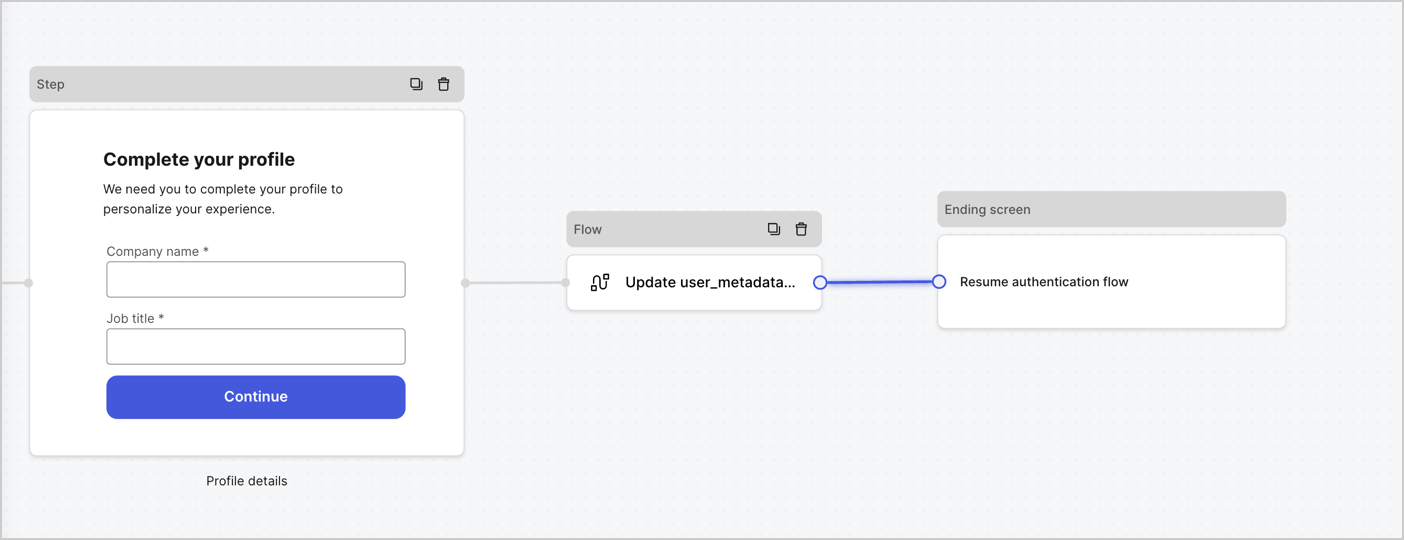
Ajoutez un nœud **Flow** après le nœud **Step** pour mettre à jour `user_metadata` et reprendre le flux d’authentification en suivant ces étapes :

1. Sélectionnez **Flow** au bas de l’éditeur de formulaires.
2. Supprimez le lien existant entre les nœuds **Step** et **Ending Screen**.
3. Sélectionnez le nouveau **Flow** > **Click to add a flow** > **Create a new flow.**

   * Saisissez `Update user_metadata` dans le champ **Name**.
   * Sélectionnez **Create**.
   * Sélectionnez **Save**.
4. Reliez le nœud **Flow** aux nœuds **Step** et **Ending Screen**, comme illustré ci-dessous.
5. Sélectionnez **Publish** pour enregistrer.
<Frame>
  <img src="https://mintcdn.com/docs-dev-feat-sdk-reference-docs/FaH4AVZw-B21Gt8Q/docs/images/cdy7uua7fh8z/5C91DaWn4LGtJT9BF87ssu/095171d0c452a287c44bfde12fd6d13f/link-nodes.png?fit=max&auto=format&n=FaH4AVZw-B21Gt8Q&q=85&s=d604fd8c997e5361fa962163515181f5" alt="Dashboard > Actions > Forms > Form" data-og-width="1404" width="1404" data-og-height="540" height="540" data-path="docs/images/cdy7uua7fh8z/5C91DaWn4LGtJT9BF87ssu/095171d0c452a287c44bfde12fd6d13f/link-nodes.png" data-optimize="true" data-opv="3" srcset="https://mintcdn.com/docs-dev-feat-sdk-reference-docs/FaH4AVZw-B21Gt8Q/docs/images/cdy7uua7fh8z/5C91DaWn4LGtJT9BF87ssu/095171d0c452a287c44bfde12fd6d13f/link-nodes.png?w=280&fit=max&auto=format&n=FaH4AVZw-B21Gt8Q&q=85&s=5f763b8f8e69f961158c5b5190e988c8 280w, https://mintcdn.com/docs-dev-feat-sdk-reference-docs/FaH4AVZw-B21Gt8Q/docs/images/cdy7uua7fh8z/5C91DaWn4LGtJT9BF87ssu/095171d0c452a287c44bfde12fd6d13f/link-nodes.png?w=560&fit=max&auto=format&n=FaH4AVZw-B21Gt8Q&q=85&s=b7481880338f1dc261ddcc4e3c4ab380 560w, https://mintcdn.com/docs-dev-feat-sdk-reference-docs/FaH4AVZw-B21Gt8Q/docs/images/cdy7uua7fh8z/5C91DaWn4LGtJT9BF87ssu/095171d0c452a287c44bfde12fd6d13f/link-nodes.png?w=840&fit=max&auto=format&n=FaH4AVZw-B21Gt8Q&q=85&s=3cc2fa6eb16cb5fd92eaea232b89673e 840w, https://mintcdn.com/docs-dev-feat-sdk-reference-docs/FaH4AVZw-B21Gt8Q/docs/images/cdy7uua7fh8z/5C91DaWn4LGtJT9BF87ssu/095171d0c452a287c44bfde12fd6d13f/link-nodes.png?w=1100&fit=max&auto=format&n=FaH4AVZw-B21Gt8Q&q=85&s=99b7aac0f80c4ffc7e53ef2066f0f5c4 1100w, https://mintcdn.com/docs-dev-feat-sdk-reference-docs/FaH4AVZw-B21Gt8Q/docs/images/cdy7uua7fh8z/5C91DaWn4LGtJT9BF87ssu/095171d0c452a287c44bfde12fd6d13f/link-nodes.png?w=1650&fit=max&auto=format&n=FaH4AVZw-B21Gt8Q&q=85&s=640e4cadb0fc8a458fa7ea9f58bfb526 1650w, https://mintcdn.com/docs-dev-feat-sdk-reference-docs/FaH4AVZw-B21Gt8Q/docs/images/cdy7uua7fh8z/5C91DaWn4LGtJT9BF87ssu/095171d0c452a287c44bfde12fd6d13f/link-nodes.png?w=2500&fit=max&auto=format&n=FaH4AVZw-B21Gt8Q&q=85&s=f89fcdaba6ff27f6baa2e2e1440cb41d 2500w" />
</Frame>

Ajoutez une action Auth0 **Update user** au flux en suivant ces étapes :

1. Sélectionnez le flux **Update user\_metadata**, puis sélectionnez **Edit Flow** pour ouvrir l’éditeur de flux dans un nouvel onglet.
2. Sous l’action **Start**, sélectionnez l’icône **+** pour ajouter une action **Update user**. Remplissez les champs ci-dessous, puis sélectionnez **Save** pour continuer.

   * **Connection** : Dans la liste déroulante, sélectionnez la connexion Vault de votre application M2M.

   * **User ID** : Saisissez `{{context.user.user_id}}`.

   * **Body** : Copiez-collez le code suivant pour mettre à jour `user_metadata` avec les propriétés `job_title` et `company_name`.

     ```json lines theme={null}
     {
        "user_metadata": {
           "job_title": "{{fields.job_title}}",
           "company_name": "{{fields.company_name}}"
        }
     }
     ```

   * Sélectionnez **Save**.
3. Sélectionnez **Publish** pour enregistrer.

<Frame>
  <img src="https://mintcdn.com/docs-dev-feat-sdk-reference-docs/0tYOZc0OW-lAvvrU/docs/images/cdy7uua7fh8z/65Jx4W5oIZJyyvA8z4HqIx/0661b1a8ca6361c54fc4fef07ba59f0b/update-user.png?fit=max&auto=format&n=0tYOZc0OW-lAvvrU&q=85&s=c66a78d10b664e1c4c476c154126d7ec" alt="Dashboard > Actions > Forms > Flows" data-og-width="1404" width="1404" data-og-height="244" height="244" data-path="docs/images/cdy7uua7fh8z/65Jx4W5oIZJyyvA8z4HqIx/0661b1a8ca6361c54fc4fef07ba59f0b/update-user.png" data-optimize="true" data-opv="3" srcset="https://mintcdn.com/docs-dev-feat-sdk-reference-docs/0tYOZc0OW-lAvvrU/docs/images/cdy7uua7fh8z/65Jx4W5oIZJyyvA8z4HqIx/0661b1a8ca6361c54fc4fef07ba59f0b/update-user.png?w=280&fit=max&auto=format&n=0tYOZc0OW-lAvvrU&q=85&s=8d53c2f0e4642b58a8cfa6ece2118e0a 280w, https://mintcdn.com/docs-dev-feat-sdk-reference-docs/0tYOZc0OW-lAvvrU/docs/images/cdy7uua7fh8z/65Jx4W5oIZJyyvA8z4HqIx/0661b1a8ca6361c54fc4fef07ba59f0b/update-user.png?w=560&fit=max&auto=format&n=0tYOZc0OW-lAvvrU&q=85&s=8f242001bd4163284abb4e4dc43645dc 560w, https://mintcdn.com/docs-dev-feat-sdk-reference-docs/0tYOZc0OW-lAvvrU/docs/images/cdy7uua7fh8z/65Jx4W5oIZJyyvA8z4HqIx/0661b1a8ca6361c54fc4fef07ba59f0b/update-user.png?w=840&fit=max&auto=format&n=0tYOZc0OW-lAvvrU&q=85&s=b72989dd379d71d720b2b0a48bfeb5a0 840w, https://mintcdn.com/docs-dev-feat-sdk-reference-docs/0tYOZc0OW-lAvvrU/docs/images/cdy7uua7fh8z/65Jx4W5oIZJyyvA8z4HqIx/0661b1a8ca6361c54fc4fef07ba59f0b/update-user.png?w=1100&fit=max&auto=format&n=0tYOZc0OW-lAvvrU&q=85&s=0bd773eb3af77923d20dc668e509253b 1100w, https://mintcdn.com/docs-dev-feat-sdk-reference-docs/0tYOZc0OW-lAvvrU/docs/images/cdy7uua7fh8z/65Jx4W5oIZJyyvA8z4HqIx/0661b1a8ca6361c54fc4fef07ba59f0b/update-user.png?w=1650&fit=max&auto=format&n=0tYOZc0OW-lAvvrU&q=85&s=8c505d8e50a555080ffc463fd676d3ab 1650w, https://mintcdn.com/docs-dev-feat-sdk-reference-docs/0tYOZc0OW-lAvvrU/docs/images/cdy7uua7fh8z/65Jx4W5oIZJyyvA8z4HqIx/0661b1a8ca6361c54fc4fef07ba59f0b/update-user.png?w=2500&fit=max&auto=format&n=0tYOZc0OW-lAvvrU&q=85&s=cad06353551812bcd7a955fc49befe61 2500w" />
</Frame>

<h3 id="retrieve-the-form-render-code">
  Récupérer le code de rendu du formulaire
</h3>

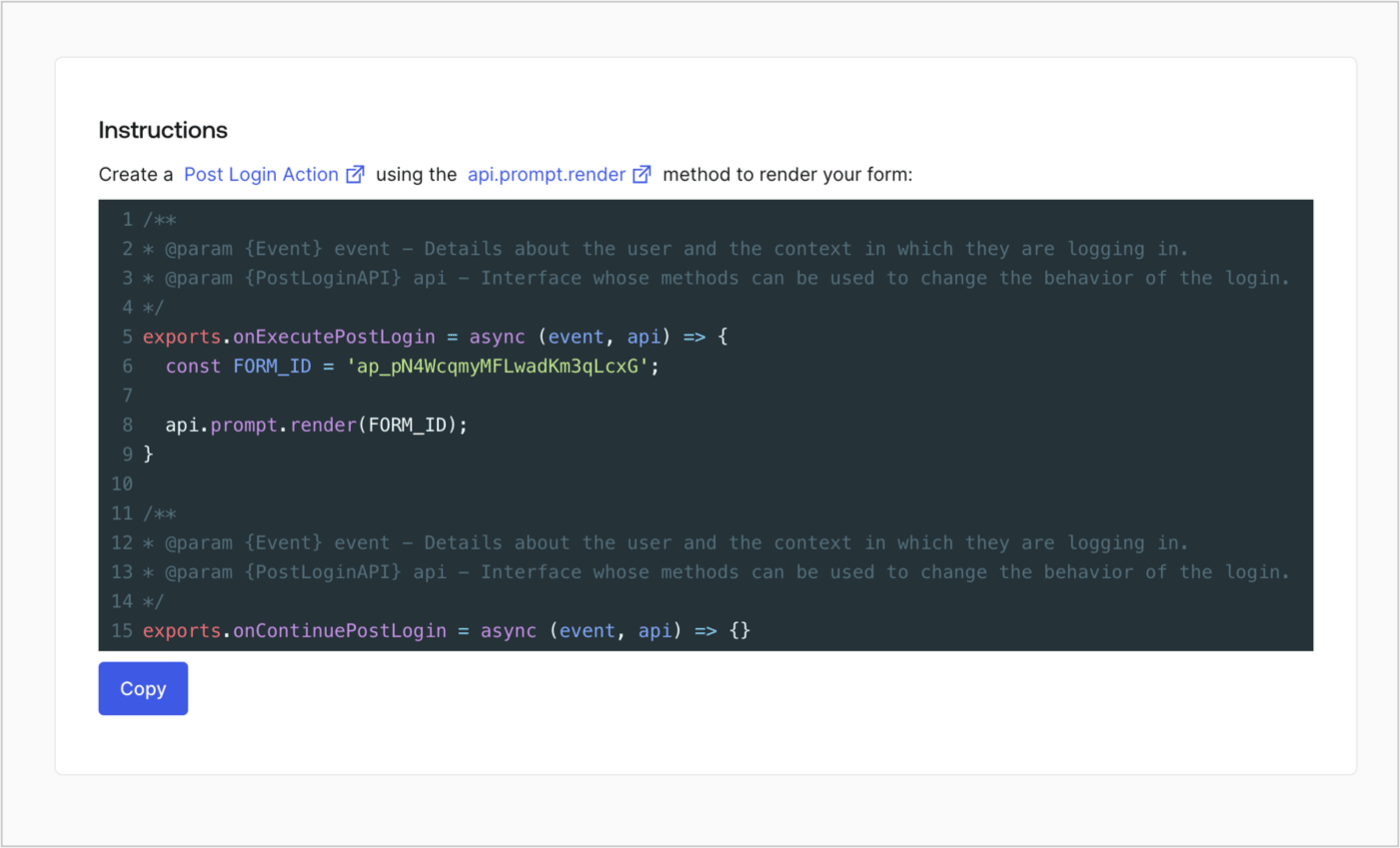
Récupérez le code de rendu du formulaire pour l’afficher à l’aide d’une Action Post Login personnalisée en suivant ces étapes :

* Dans l’éditeur de formulaires, sélectionnez **`<> Render`**.
* Sélectionnez **Copy**.
<Frame>
  <img src="https://mintcdn.com/docs-dev-feat-sdk-reference-docs/cH8SproRs4WJoPzC/docs/images/cdy7uua7fh8z/2EIUzc539sq9lwoTKbjoJv/496a864c0fc44a782c9cadca119dbfb0/embed.png?fit=max&auto=format&n=cH8SproRs4WJoPzC&q=85&s=0348bac1e775dd1f0aa44781a4396182" alt="Dashboard > Actions > Forms > Form > Embed" data-og-width="1400" width="1400" data-og-height="848" height="848" data-path="docs/images/cdy7uua7fh8z/2EIUzc539sq9lwoTKbjoJv/496a864c0fc44a782c9cadca119dbfb0/embed.png" data-optimize="true" data-opv="3" srcset="https://mintcdn.com/docs-dev-feat-sdk-reference-docs/cH8SproRs4WJoPzC/docs/images/cdy7uua7fh8z/2EIUzc539sq9lwoTKbjoJv/496a864c0fc44a782c9cadca119dbfb0/embed.png?w=280&fit=max&auto=format&n=cH8SproRs4WJoPzC&q=85&s=802852de44d78919f4584a26cb23c4e0 280w, https://mintcdn.com/docs-dev-feat-sdk-reference-docs/cH8SproRs4WJoPzC/docs/images/cdy7uua7fh8z/2EIUzc539sq9lwoTKbjoJv/496a864c0fc44a782c9cadca119dbfb0/embed.png?w=560&fit=max&auto=format&n=cH8SproRs4WJoPzC&q=85&s=e1b310b92564c814b461ae84dd8c28ea 560w, https://mintcdn.com/docs-dev-feat-sdk-reference-docs/cH8SproRs4WJoPzC/docs/images/cdy7uua7fh8z/2EIUzc539sq9lwoTKbjoJv/496a864c0fc44a782c9cadca119dbfb0/embed.png?w=840&fit=max&auto=format&n=cH8SproRs4WJoPzC&q=85&s=b01e1d3f7b2f77a5f94e5cfbff037d64 840w, https://mintcdn.com/docs-dev-feat-sdk-reference-docs/cH8SproRs4WJoPzC/docs/images/cdy7uua7fh8z/2EIUzc539sq9lwoTKbjoJv/496a864c0fc44a782c9cadca119dbfb0/embed.png?w=1100&fit=max&auto=format&n=cH8SproRs4WJoPzC&q=85&s=c480cd04c9b0aeb04c40483ce89030be 1100w, https://mintcdn.com/docs-dev-feat-sdk-reference-docs/cH8SproRs4WJoPzC/docs/images/cdy7uua7fh8z/2EIUzc539sq9lwoTKbjoJv/496a864c0fc44a782c9cadca119dbfb0/embed.png?w=1650&fit=max&auto=format&n=cH8SproRs4WJoPzC&q=85&s=23bf784e6b78d3b38dbda763eb7013f9 1650w, https://mintcdn.com/docs-dev-feat-sdk-reference-docs/cH8SproRs4WJoPzC/docs/images/cdy7uua7fh8z/2EIUzc539sq9lwoTKbjoJv/496a864c0fc44a782c9cadca119dbfb0/embed.png?w=2500&fit=max&auto=format&n=cH8SproRs4WJoPzC&q=85&s=1776116eaf817fa922dd110673279f9e 2500w" />
</Frame>

<h2 id="create-a-post-login-action">
  Créer une Action Post Login
</h2>

Créez une Action post-login pour afficher votre formulaire en suivant ces étapes :

1. Accédez à **Auth0 Dashboard > Actions > Flows > Login.**
2. Sélectionnez l’icône **+**, puis **Build from scratch** :

   * **Name** : Entrez `Render Progressive Profile Form`.
   * **Trigger** : Sélectionnez `Login / Post Login`.
   * **Runtime** : Sélectionnez la version recommandée.
3. Sélectionnez **Create**.

Pour configurer l’Action post-login :

1. Supprimez le code existant dans l’éditeur Code.
2. Collez le code d’intégration du formulaire dans l’éditeur Code.
3. Modifiez le code pour définir la logique conditionnelle qui affichera le formulaire.

   ```javascript lines theme={null}
   /**
   * @param {Event} event - Détails sur l’utilisateur et le contexte dans lequel il se connecte.
   * @param {PostLoginAPI} api - Interface dont les méthodes peuvent être utilisées pour modifier le comportement de la connexion.
   */
   exports.onExecutePostLogin = async (event, api) => {
     const FORM_ID = 'REPLACE_WITH_YOUR_FORM_ID';

     if (
       event.stats.logins_count > 2 &&
       !event.user.user_metadata.company_name &&
       !event.user.user_metadata.job_title
     ) {
       api.prompt.render(FORM_ID);
     }
   }

   exports.onContinuePostLogin = async (event, api) => { }
   ```

   <Callout icon="file-lines" color="#0EA5E9" iconType="regular">
     L’exemple de code ci-dessus affiche le formulaire lorsqu’un utilisateur a un nombre de connexions > 2 et que les propriétés de métadonnées utilisateur company\_name et job\_title sont absentes.
   </Callout>
4. Sélectionnez **Deploy.**
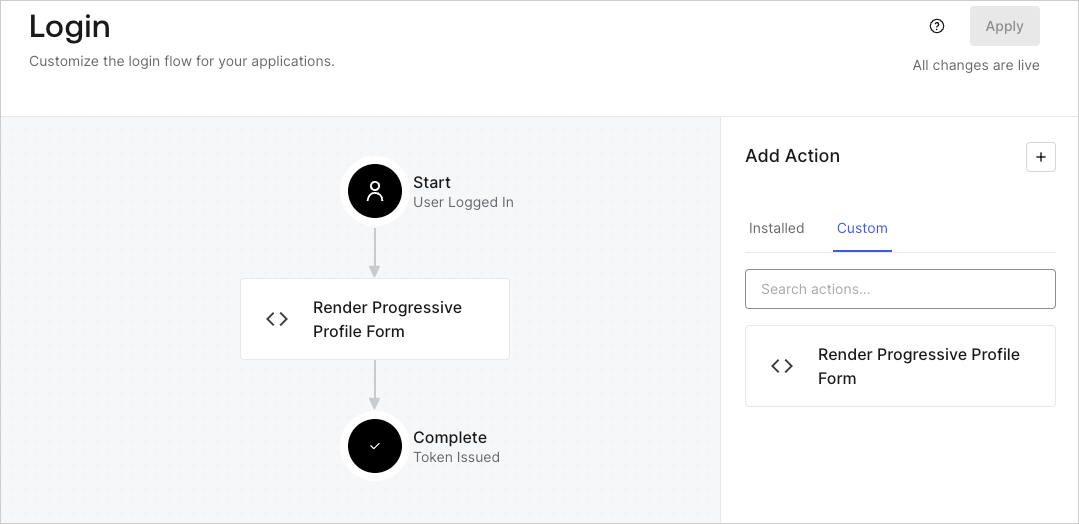
5. Glissez-déposez l’Action **Render Progressive Profile Form** dans le **Login flow**.
   <Frame>
     <img src="https://mintcdn.com/docs-dev-feat-sdk-reference-docs/vVLrCzoor0V6dTvM/docs/images/cdy7uua7fh8z/1QjjZdpTqTxx012UDN4xk9/99fba5ef4068a5688f1762eea7f42976/renderprogessiveprofile.png?fit=max&auto=format&n=vVLrCzoor0V6dTvM&q=85&s=797640d18f8c63f80fc16db95e940989" alt="Dashboard > Forms > Use Cases Progressive Profile Login Action" data-og-width="1079" width="1079" data-og-height="524" height="524" data-path="docs/images/cdy7uua7fh8z/1QjjZdpTqTxx012UDN4xk9/99fba5ef4068a5688f1762eea7f42976/renderprogessiveprofile.png" data-optimize="true" data-opv="3" srcset="https://mintcdn.com/docs-dev-feat-sdk-reference-docs/vVLrCzoor0V6dTvM/docs/images/cdy7uua7fh8z/1QjjZdpTqTxx012UDN4xk9/99fba5ef4068a5688f1762eea7f42976/renderprogessiveprofile.png?w=280&fit=max&auto=format&n=vVLrCzoor0V6dTvM&q=85&s=e23bcf05dabde9bc8bf472624c962163 280w, https://mintcdn.com/docs-dev-feat-sdk-reference-docs/vVLrCzoor0V6dTvM/docs/images/cdy7uua7fh8z/1QjjZdpTqTxx012UDN4xk9/99fba5ef4068a5688f1762eea7f42976/renderprogessiveprofile.png?w=560&fit=max&auto=format&n=vVLrCzoor0V6dTvM&q=85&s=1b1773ba0e053ec63bd4f07d3842c690 560w, https://mintcdn.com/docs-dev-feat-sdk-reference-docs/vVLrCzoor0V6dTvM/docs/images/cdy7uua7fh8z/1QjjZdpTqTxx012UDN4xk9/99fba5ef4068a5688f1762eea7f42976/renderprogessiveprofile.png?w=840&fit=max&auto=format&n=vVLrCzoor0V6dTvM&q=85&s=33bb4d18b907316c36385e336abf6917 840w, https://mintcdn.com/docs-dev-feat-sdk-reference-docs/vVLrCzoor0V6dTvM/docs/images/cdy7uua7fh8z/1QjjZdpTqTxx012UDN4xk9/99fba5ef4068a5688f1762eea7f42976/renderprogessiveprofile.png?w=1100&fit=max&auto=format&n=vVLrCzoor0V6dTvM&q=85&s=84bacd1f33a5c1c0e11afc72ed1112a7 1100w, https://mintcdn.com/docs-dev-feat-sdk-reference-docs/vVLrCzoor0V6dTvM/docs/images/cdy7uua7fh8z/1QjjZdpTqTxx012UDN4xk9/99fba5ef4068a5688f1762eea7f42976/renderprogessiveprofile.png?w=1650&fit=max&auto=format&n=vVLrCzoor0V6dTvM&q=85&s=94ef77bb4a6cc664398bfbba77454dbb 1650w, https://mintcdn.com/docs-dev-feat-sdk-reference-docs/vVLrCzoor0V6dTvM/docs/images/cdy7uua7fh8z/1QjjZdpTqTxx012UDN4xk9/99fba5ef4068a5688f1762eea7f42976/renderprogessiveprofile.png?w=2500&fit=max&auto=format&n=vVLrCzoor0V6dTvM&q=85&s=4c94f6433a6617646628b1b5aa8f9bc3 2500w" />
   </Frame>
6. Sélectionnez **Apply**.

<h3 id="test-implementation">
  Tester la mise en œuvre
</h3>

Testez la mise en œuvre en suivant ces étapes :

1. Connectez-vous avec un utilisateur existant dont le nombre de connexions est supérieur à 2 et dont les attributs `user_metadata` `company_name` et `job_title` sont vides.
2. L’action post-login du Login flow affichera le formulaire et demandera ces renseignements.
3. Sélectionnez **Auth0 Dashboard > User Management > Users,** repérez l’utilisateur et vérifiez que les attributs `user_metadata` `company_name` et `job_title` contiennent bien des renseignements.
