> ## Documentation Index
> Fetch the complete documentation index at: https://docs-dev-feat-sdk-reference-docs.mintlify.site/llms.txt
> Use this file to discover all available pages before exploring further.

> Découvrez comment configurer vos connexions Vault HTTP pour autoriser les requêtes HTTP vers des API ou des services externes.

# connexion Vault HTTP

<h2 id="configure-your-http-vault-connection-options">
  Configurez les options de votre connexion Vault HTTP
</h2>

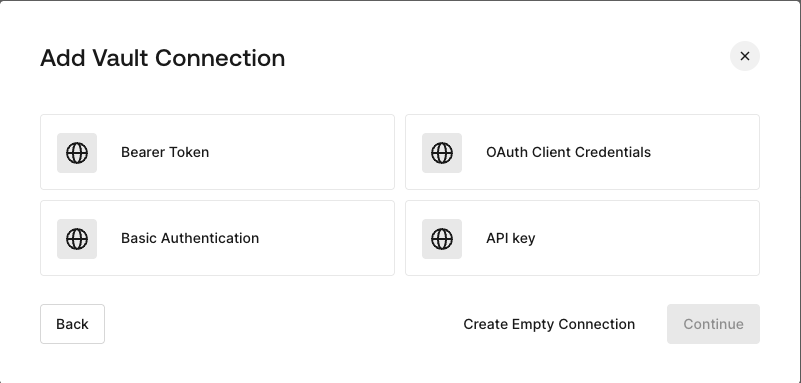
Vous pouvez configurer connexion Vault HTTP avec différentes options d’authentification, puis l’utiliser dans vos HTTP Request Flow Actions.
<Frame>
  <img src="https://mintcdn.com/docs-dev-feat-sdk-reference-docs/8mFNllJO8zv9wchk/docs/images/customize/forms/vaults/http-vault-connection-options.png?fit=max&auto=format&n=8mFNllJO8zv9wchk&q=85&s=95c4aaf32e2696242a6afb8325b2616f" alt="Dashboard > Actions > Forms > Vault > HTTP" data-og-width="801" width="801" data-og-height="383" height="383" data-path="docs/images/customize/forms/vaults/http-vault-connection-options.png" data-optimize="true" data-opv="3" srcset="https://mintcdn.com/docs-dev-feat-sdk-reference-docs/8mFNllJO8zv9wchk/docs/images/customize/forms/vaults/http-vault-connection-options.png?w=280&fit=max&auto=format&n=8mFNllJO8zv9wchk&q=85&s=9a3bc1df4fb13f1dde3d5226b1cdfa13 280w, https://mintcdn.com/docs-dev-feat-sdk-reference-docs/8mFNllJO8zv9wchk/docs/images/customize/forms/vaults/http-vault-connection-options.png?w=560&fit=max&auto=format&n=8mFNllJO8zv9wchk&q=85&s=1fe884cb624d2cd253ce68324b80c5e3 560w, https://mintcdn.com/docs-dev-feat-sdk-reference-docs/8mFNllJO8zv9wchk/docs/images/customize/forms/vaults/http-vault-connection-options.png?w=840&fit=max&auto=format&n=8mFNllJO8zv9wchk&q=85&s=8ba2d193ce88d7af3be4f505a33e04ed 840w, https://mintcdn.com/docs-dev-feat-sdk-reference-docs/8mFNllJO8zv9wchk/docs/images/customize/forms/vaults/http-vault-connection-options.png?w=1100&fit=max&auto=format&n=8mFNllJO8zv9wchk&q=85&s=9c85e9b755e1681dae638cd0dc9272f4 1100w, https://mintcdn.com/docs-dev-feat-sdk-reference-docs/8mFNllJO8zv9wchk/docs/images/customize/forms/vaults/http-vault-connection-options.png?w=1650&fit=max&auto=format&n=8mFNllJO8zv9wchk&q=85&s=3add78878116ba4d3effded27f67e1dc 1650w, https://mintcdn.com/docs-dev-feat-sdk-reference-docs/8mFNllJO8zv9wchk/docs/images/customize/forms/vaults/http-vault-connection-options.png?w=2500&fit=max&auto=format&n=8mFNllJO8zv9wchk&q=85&s=d363248c4f09c8aa59c732d36d48b4a2 2500w" />
</Frame>

<h2 id="configure-your-http-vault-connection-for-bearer-token">
  Configurer votre connexion Vault HTTP pour l’authentification Bearer Token
</h2>

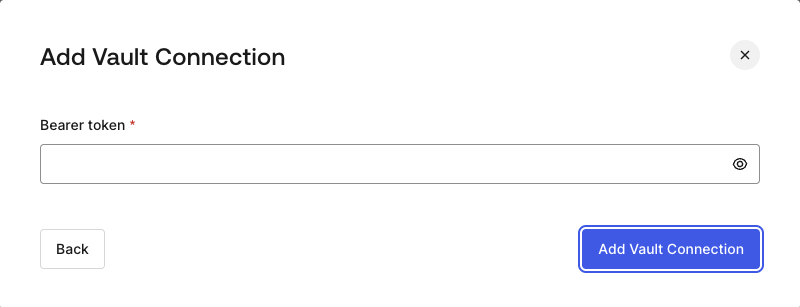
Pour configurer une connexion Vault HTTP à l’aide de l’autorisation **Bearer Token**, vous devez définir les paramètres requis.
<Frame>
  <img src="https://mintcdn.com/docs-dev-feat-sdk-reference-docs/8mFNllJO8zv9wchk/docs/images/customize/forms/vaults/http-vault-connection-bearer-token.png?fit=max&auto=format&n=8mFNllJO8zv9wchk&q=85&s=601f4b0327fbc306395f8f8a257bc9d2" alt="Dashboard > Actions > Forms > Vault > HTTP" data-og-width="800" width="800" data-og-height="307" height="307" data-path="docs/images/customize/forms/vaults/http-vault-connection-bearer-token.png" data-optimize="true" data-opv="3" srcset="https://mintcdn.com/docs-dev-feat-sdk-reference-docs/8mFNllJO8zv9wchk/docs/images/customize/forms/vaults/http-vault-connection-bearer-token.png?w=280&fit=max&auto=format&n=8mFNllJO8zv9wchk&q=85&s=02d3a87a3bb0f42239ac2d8cf9c6d9aa 280w, https://mintcdn.com/docs-dev-feat-sdk-reference-docs/8mFNllJO8zv9wchk/docs/images/customize/forms/vaults/http-vault-connection-bearer-token.png?w=560&fit=max&auto=format&n=8mFNllJO8zv9wchk&q=85&s=af28ee33f6512b21ce99206a984211ce 560w, https://mintcdn.com/docs-dev-feat-sdk-reference-docs/8mFNllJO8zv9wchk/docs/images/customize/forms/vaults/http-vault-connection-bearer-token.png?w=840&fit=max&auto=format&n=8mFNllJO8zv9wchk&q=85&s=aa210211d29b6faead9270a5cbb91d49 840w, https://mintcdn.com/docs-dev-feat-sdk-reference-docs/8mFNllJO8zv9wchk/docs/images/customize/forms/vaults/http-vault-connection-bearer-token.png?w=1100&fit=max&auto=format&n=8mFNllJO8zv9wchk&q=85&s=c7e2064eef7f1ceec3a7c6c11c5f7b49 1100w, https://mintcdn.com/docs-dev-feat-sdk-reference-docs/8mFNllJO8zv9wchk/docs/images/customize/forms/vaults/http-vault-connection-bearer-token.png?w=1650&fit=max&auto=format&n=8mFNllJO8zv9wchk&q=85&s=503f5b0bfef06b9fb9b2b9c52dd72b17 1650w, https://mintcdn.com/docs-dev-feat-sdk-reference-docs/8mFNllJO8zv9wchk/docs/images/customize/forms/vaults/http-vault-connection-bearer-token.png?w=2500&fit=max&auto=format&n=8mFNllJO8zv9wchk&q=85&s=ace52d7940d63122dd1ff063432c9a16 2500w" />
</Frame>

<h3 id="input-settings">
  Paramètres d’entrée
</h3>

| Paramètre | Description |
| - | - |
| Bearer Token | Jeton statique utilisé pour l’autorisation auprès d’un service externe. |

<h2 id="configure-your-http-vault-connection-for-oauth-client-credentials">
  Configurez votre connexion Vault HTTP pour les informations d’identification du client OAuth
</h2>

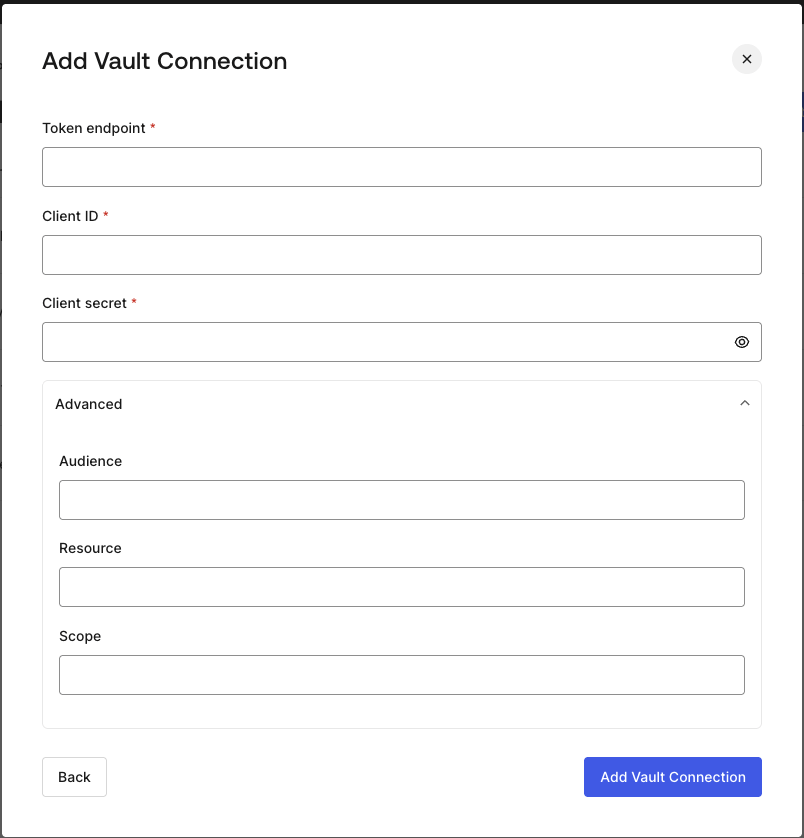
Pour configurer une connexion Vault HTTP à l’aide de l’autorisation **Client Credentials**, vous devez définir les paramètres requis.
<Frame>
  <img src="https://mintcdn.com/docs-dev-feat-sdk-reference-docs/8mFNllJO8zv9wchk/docs/images/customize/forms/vaults/http-vault-connection-oauth-client-credentials.png?fit=max&auto=format&n=8mFNllJO8zv9wchk&q=85&s=e1a4005efaeceb794f0b67c396db0cb9" alt="Dashboard > Actions > Forms > Vault > HTTP " data-og-width="804" width="804" data-og-height="838" height="838" data-path="docs/images/customize/forms/vaults/http-vault-connection-oauth-client-credentials.png" data-optimize="true" data-opv="3" srcset="https://mintcdn.com/docs-dev-feat-sdk-reference-docs/8mFNllJO8zv9wchk/docs/images/customize/forms/vaults/http-vault-connection-oauth-client-credentials.png?w=280&fit=max&auto=format&n=8mFNllJO8zv9wchk&q=85&s=dde65051829b26948b30bb2ba019c1ff 280w, https://mintcdn.com/docs-dev-feat-sdk-reference-docs/8mFNllJO8zv9wchk/docs/images/customize/forms/vaults/http-vault-connection-oauth-client-credentials.png?w=560&fit=max&auto=format&n=8mFNllJO8zv9wchk&q=85&s=6162f7e7a4ba38ebb2037338550e8adc 560w, https://mintcdn.com/docs-dev-feat-sdk-reference-docs/8mFNllJO8zv9wchk/docs/images/customize/forms/vaults/http-vault-connection-oauth-client-credentials.png?w=840&fit=max&auto=format&n=8mFNllJO8zv9wchk&q=85&s=9a05ac68f7bcb03db10a10209e76527b 840w, https://mintcdn.com/docs-dev-feat-sdk-reference-docs/8mFNllJO8zv9wchk/docs/images/customize/forms/vaults/http-vault-connection-oauth-client-credentials.png?w=1100&fit=max&auto=format&n=8mFNllJO8zv9wchk&q=85&s=75ef1b1680b61db1dca300029ba8179d 1100w, https://mintcdn.com/docs-dev-feat-sdk-reference-docs/8mFNllJO8zv9wchk/docs/images/customize/forms/vaults/http-vault-connection-oauth-client-credentials.png?w=1650&fit=max&auto=format&n=8mFNllJO8zv9wchk&q=85&s=1f8006a59aa69eba2f42159e40981c48 1650w, https://mintcdn.com/docs-dev-feat-sdk-reference-docs/8mFNllJO8zv9wchk/docs/images/customize/forms/vaults/http-vault-connection-oauth-client-credentials.png?w=2500&fit=max&auto=format&n=8mFNllJO8zv9wchk&q=85&s=ede0434c9e2eb3804a5f0ffc52f091dc 2500w" />
</Frame>

<h3 id="input-settings-2">
  Paramètres d’entrée
</h3>

| Parameter | Description |
| - | - |
| Point de terminaison du tenant | Point de terminaison du tenant du serveur d’autorisation qui émet les jetons d’accès. |
| ID client | ID client de votre application M2M autorisée pour l’API personnalisée. |
| Secret client | Secret client de votre application M2M autorisée pour l’API personnalisée. |
| Audience (facultatif) | Audience de l’API personnalisée. Généralement utilisée pour les API personnalisées définies dans Auth0. |
| Resource (facultatif) | Resource de l’API personnalisée. Paramètre standard dont le sens est similaire à Audience. |
| Scope (facultatif) | Liste de scopes au format String, séparés par des espaces. |

<h2 id="configure-your-http-vault-connection-for-api-key">
  Configurer votre connexion Vault HTTP avec clé API
</h2>

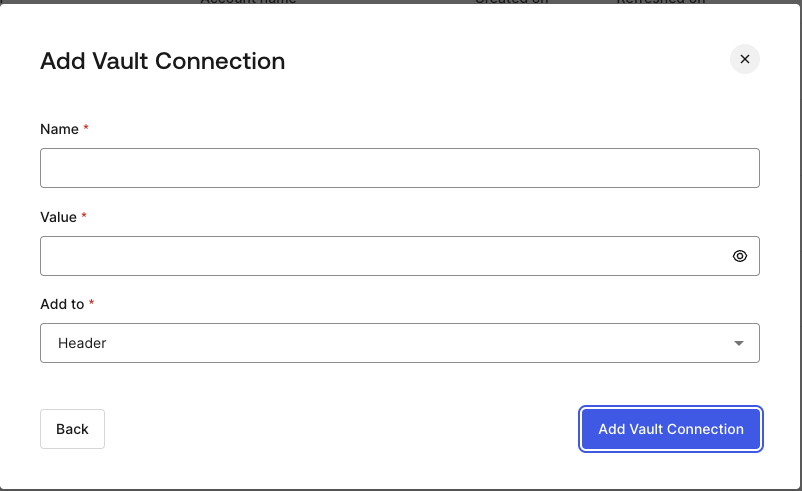
Pour configurer une connexion Vault HTTP à l’aide de l’autorisation **clé API**, vous devez définir les paramètres requis.
<Frame>
  <img src="https://mintcdn.com/docs-dev-feat-sdk-reference-docs/8mFNllJO8zv9wchk/docs/images/customize/forms/vaults/http-vault-connection-api-key.png?fit=max&auto=format&n=8mFNllJO8zv9wchk&q=85&s=39520b24e5c11c4a288c27761106de80" alt="Dashboard > Actions > Forms > Vault > HTTP " data-og-width="802" width="802" data-og-height="491" height="491" data-path="docs/images/customize/forms/vaults/http-vault-connection-api-key.png" data-optimize="true" data-opv="3" srcset="https://mintcdn.com/docs-dev-feat-sdk-reference-docs/8mFNllJO8zv9wchk/docs/images/customize/forms/vaults/http-vault-connection-api-key.png?w=280&fit=max&auto=format&n=8mFNllJO8zv9wchk&q=85&s=8e5385ff3155a6913257c9b774ede8ab 280w, https://mintcdn.com/docs-dev-feat-sdk-reference-docs/8mFNllJO8zv9wchk/docs/images/customize/forms/vaults/http-vault-connection-api-key.png?w=560&fit=max&auto=format&n=8mFNllJO8zv9wchk&q=85&s=e9ea329f6c37b7517649b107f8ed28b6 560w, https://mintcdn.com/docs-dev-feat-sdk-reference-docs/8mFNllJO8zv9wchk/docs/images/customize/forms/vaults/http-vault-connection-api-key.png?w=840&fit=max&auto=format&n=8mFNllJO8zv9wchk&q=85&s=80d5913e93881fd6418ca2bdcd972cd4 840w, https://mintcdn.com/docs-dev-feat-sdk-reference-docs/8mFNllJO8zv9wchk/docs/images/customize/forms/vaults/http-vault-connection-api-key.png?w=1100&fit=max&auto=format&n=8mFNllJO8zv9wchk&q=85&s=91873d1c5037756d912ddee9acbfb260 1100w, https://mintcdn.com/docs-dev-feat-sdk-reference-docs/8mFNllJO8zv9wchk/docs/images/customize/forms/vaults/http-vault-connection-api-key.png?w=1650&fit=max&auto=format&n=8mFNllJO8zv9wchk&q=85&s=35ea87271555e7752be1e14e961ab352 1650w, https://mintcdn.com/docs-dev-feat-sdk-reference-docs/8mFNllJO8zv9wchk/docs/images/customize/forms/vaults/http-vault-connection-api-key.png?w=2500&fit=max&auto=format&n=8mFNllJO8zv9wchk&q=85&s=912b3a107385bb7fa6680c3266a3deca 2500w" />
</Frame>

<h3 id="input-settings-3">
  Paramètres d’entrée
</h3>

| Paramètre | Description |
| - | - |
| Nom | Nom de la clé API à ajouter comme en-tête ou paramètre de requête. |
| Valeur | Valeur de la clé API à ajouter comme en-tête ou paramètre de requête. |
| Ajouter à | Par défaut, il s’agit de l’en-tête. Détermine si la clé API doit être ajoutée comme en-tête ou paramètre de requête. |

<h2 id="configure-your-http-vault-connection-for-basic-authentication">
  Configurer votre connexion Vault HTTP pour l’authentification Basic
</h2>

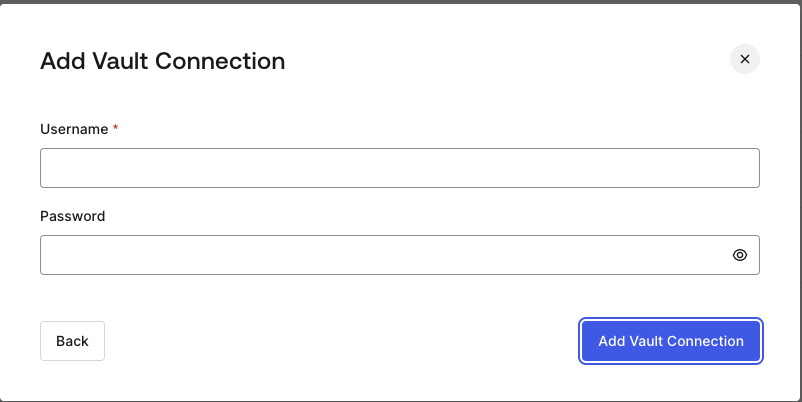
Pour configurer une connexion Vault HTTP avec l’**authentification Basic**, vous devez définir les paramètres requis.
<Frame>
  <img src="https://mintcdn.com/docs-dev-feat-sdk-reference-docs/8mFNllJO8zv9wchk/docs/images/customize/forms/vaults/http-vault-connection-basic-authentication.png?fit=max&auto=format&n=8mFNllJO8zv9wchk&q=85&s=ed55af31fd054194299f6e0890c42bbf" alt="Dashboard > Actions > Forms > Vault > HTTP " data-og-width="802" width="802" data-og-height="402" height="402" data-path="docs/images/customize/forms/vaults/http-vault-connection-basic-authentication.png" data-optimize="true" data-opv="3" srcset="https://mintcdn.com/docs-dev-feat-sdk-reference-docs/8mFNllJO8zv9wchk/docs/images/customize/forms/vaults/http-vault-connection-basic-authentication.png?w=280&fit=max&auto=format&n=8mFNllJO8zv9wchk&q=85&s=7ad169ba52a0e212ec8479e7935bcc7a 280w, https://mintcdn.com/docs-dev-feat-sdk-reference-docs/8mFNllJO8zv9wchk/docs/images/customize/forms/vaults/http-vault-connection-basic-authentication.png?w=560&fit=max&auto=format&n=8mFNllJO8zv9wchk&q=85&s=987f4d4f1f739aff2cfeda899b4e6a3a 560w, https://mintcdn.com/docs-dev-feat-sdk-reference-docs/8mFNllJO8zv9wchk/docs/images/customize/forms/vaults/http-vault-connection-basic-authentication.png?w=840&fit=max&auto=format&n=8mFNllJO8zv9wchk&q=85&s=f7707ed0c61942fbaa5c332a609b27c4 840w, https://mintcdn.com/docs-dev-feat-sdk-reference-docs/8mFNllJO8zv9wchk/docs/images/customize/forms/vaults/http-vault-connection-basic-authentication.png?w=1100&fit=max&auto=format&n=8mFNllJO8zv9wchk&q=85&s=2802bb5ddb01b5cf332a9e4eed3d44cd 1100w, https://mintcdn.com/docs-dev-feat-sdk-reference-docs/8mFNllJO8zv9wchk/docs/images/customize/forms/vaults/http-vault-connection-basic-authentication.png?w=1650&fit=max&auto=format&n=8mFNllJO8zv9wchk&q=85&s=33d25fe306a177869e5a94984080c9bb 1650w, https://mintcdn.com/docs-dev-feat-sdk-reference-docs/8mFNllJO8zv9wchk/docs/images/customize/forms/vaults/http-vault-connection-basic-authentication.png?w=2500&fit=max&auto=format&n=8mFNllJO8zv9wchk&q=85&s=03c3737363f5034a115d7a8a76cf3a02 2500w" />
</Frame>

<h3 id="input-settings-4">
  Paramètres d’entrée
</h3>

| Paramètre | Description |
| - | - |
| Nom d’utilisateur | Nom d’utilisateur à concaténer et à encoder en base64, puis à ajouter comme paramètre d’en-tête Authorization Basic. |
| Mot de passe | Mot de passe à concaténer et à encoder en base64, puis à ajouter comme paramètre d’en-tête Authorization Basic. |

<Warning>
  La configuration connexion Vault HTTP avec authentification Basic est appelée à remplacer l’option actuellement intégrée à l’Action HTTP Request de Flows.
</Warning>
