> ## Documentation Index
> Fetch the complete documentation index at: https://docs-dev-feat-sdk-reference-docs.mintlify.site/llms.txt
> Use this file to discover all available pages before exploring further.
> HTTP Request Flow Actionsを設定して、外部APIやサービスにカスタムリクエストを送信する方法を説明します。
# HTTP Request
[HTTP Vault Connection](/docs/ja-jp/customize/forms/vaults/http) で、HTTP Request Flow Actions 用の Vault 接続の設定方法をご確認ください。
HTTP Request
HTTP Request Action を使用すると、外部の API やサービスを呼び出し、そのレスポンスを処理できます。
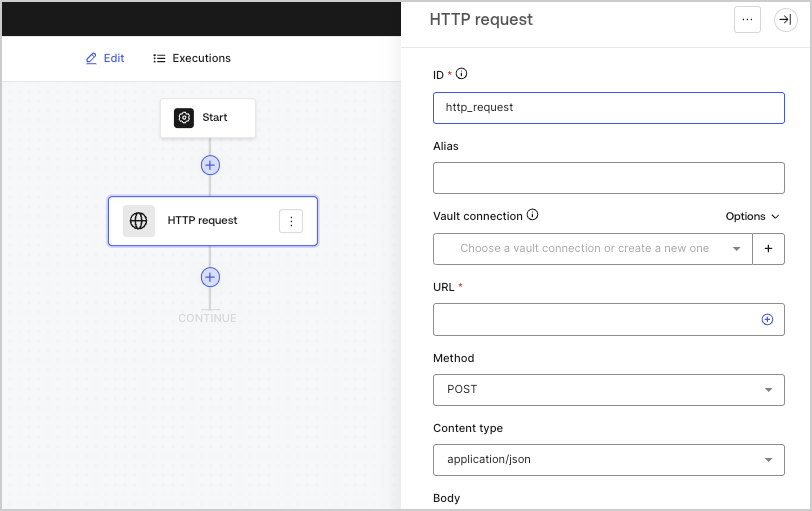 | パラメータ | 説明 |
| - | - |
| メソッド | HTTPメソッドです。使用できる値は次のとおりです。
| パラメータ | 説明 |
| - | - |
| メソッド | HTTPメソッドです。使用できる値は次のとおりです。 - `GET`
- `POST`
- `PUT`
- `PATCH`
- `DELETE`
|
| Content type | `Content-Type` ヘッダーです。使用できる値は次のとおりです。 - `application/json`
- `application/x-www-form-urlenconded`
- `application/xml`
|
| ボディ | リクエストの本文です。 |
| Headers | リクエストのヘッダーです。 |
| URL params | URLパラメーターです。これらのパラメーターは自動的にURLエンコードされます。 |
| Enable Basic Auth | ユーザー名とパスワードを使用した認証を有効にします。 |
出力オブジェクト
| プロパティ | 型 | 説明 |
| - | - | - |
| `headers` | オブジェクト | レスポンスのヘッダーです。 |
| `body` | オブジェクト | レスポンスのボディです。 |
| `status` | 数値 | レスポンスのステータスコードです。 |
| `success` | ブール値 | レスポンスの`status`に応じて`true`または`false`を返します。 |
出力オブジェクトの例
```json lines theme={null}
{
"headers": {
...
},
"status": 200,
"body": {
...
},
"success": true
}
```